R12.1 JA-2025July15
Basic Operations on Canvas
After Bot UI Settings are defined, you can start to define the automation flow on the canvas.
| Operations | Toolbar |
|---|---|
| Undo/Redo |  |
| Delete a node | Select and press the “Delete” button on the keyboard |
| Link two nodes | Drag the line from node 1 to node 2.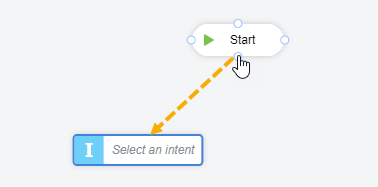 |
| Edit the bot name and description |  |
| Exist the Edit mode and return to the bot manager. |  |
| Display the flowchart fully and proportionally |  |
| Zoom in/out the flowchart |  |
| Show/hide the left pane |  |
| Show/hide the right pane |  |
| Change the node name shown on the canvas | For the intent node, intent template node, automation data table node, and prompt node, double-click the node and enter the name. |
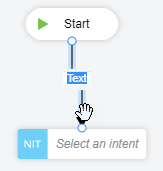
| Change the link name shown on the canvas | Double-click the link and enter the text. |