R12.1 Project Publication-2025Dec23
Manage Added ADT View
Users can manage the added ADT views in Triggered Automation Manager > TAF Lite tab.
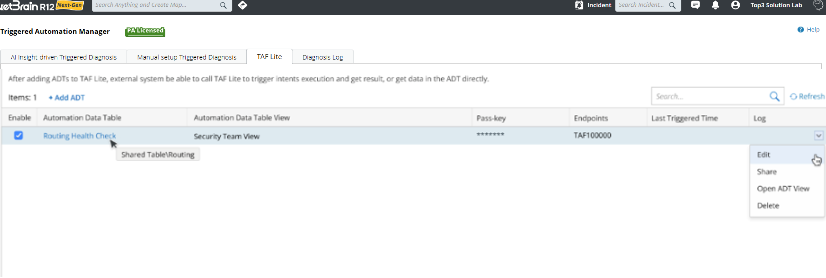
To understand each column in the TAF Lite table:
- Enable: Enable or disable TAF Lite for the ADT view.
- Automation Data Table: The ADT name
- Automation Data Table View: A clickable name for the ADT view. Users can click it and view the ADT view on a new web page.
- Pass-key: The pass-key will be masked with asterisks "******" for security purpose.
- Endpoints: The unique endpoint is system-generated and not editable.
- Last Triggered Time: The most recent API-triggered time.
-
Log: Click View to view the execution log of the last API call.

Users can right-click each entry, and choose from the drop-down menu to further manage the ADT view:
- Edit: Modify the settings for the entry.
-
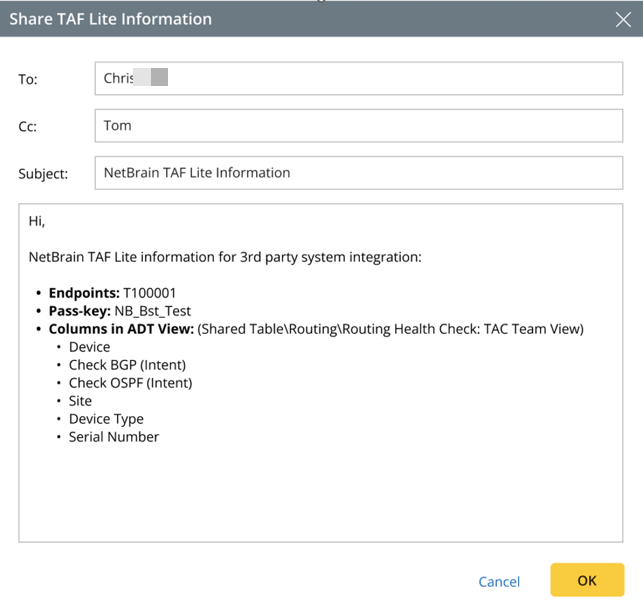
Share: Share TAF Lite information with others via NetBrain email system.
- Open ADT View: Open the selected ADT View.
- Delete: Delete the entry.