| Privileges | Explanation | Domain Admin | Power User | Engineer | Guest | Network Change Creator | Network Change Executor | Network Change Approver | Portal Temp User |
| Domain Management | Log in to the Domain Management page and do the following domain management tasks: - View, export, and delete discovery report in the Data Accuracy Resolution
- Add network definition
- View, add, modify, delete, and disable topology links in the Topology Link Manager
- Resolve duplicated IPs and subnets in the Duplicated IP and Subnet Manager
- Add checkpoint OPSEC tasks in the Checkpoint OPSEC Manager
- Configure network security settings and L2/L3 topology building options
- Configure a desktop profile for all users under a domain
| √ | √ | | | √ | √ | √ | |
| Share Policy Management | Configure share policy (assign domain access and privileges to other users in this domain) | √ | | | | | | | |
| Device Management | - Add, modify, and remove MPLS cloud
- Remove devices from a domain
| √ | √ | | | √ | √ | √ | |
| Shared Resource and File Management | Only the system/tenant administrator can edit built-in files in the shared folder of Device Group, Qapp, Gapp, Parser, Dashboard Widget and Template, and Runbook Template | √ | √ | √ | | √ | √ | √ | |
| Site Management | - Add MPLS clouds and unclassified network devices from the Data Accuracy Resolution to a site
- Open the Site Manager to do site management, such as creating, editing, deleting, importing, committing, and rebuilding sites
| √ | √ | | | √ | √ | √ | |
| Discover/Tune Network Device | - Create a do-not-scan list
- Add discovery tasks from the Start Page or the Schedule Task page
- Rediscover selected IPs and devices in the Data Accuracy Resolution
- Tune live access
- Run on-demand discoveries
| √ | √ | | | √ | √ | √ | |
| Schedule Benchmark | Add benchmark tasks from the Start Page or the Schedule Task page | √ | √ | | | √ | √ | √ | |
| Manage Network Settings | Configure and manage shared network settings | √ | √ | | | √ | √ | √ | |
| Manage Device Settings | Configure and manage shared device settings for each device in a domain from the following entries: - Site pane
- Map
- Data Accuracy Resolution
- Discover
- Tune Live Access
| √ | √ | √ | | √ | √ | √ | |
| Access to Live Network | Retrieve live device data from the network, which includes: - Run CLI commands and Qapps on a map page or in a runbook
- Run monitor (Qapp-based) widgets and retrieve live data in static widgets in a dashboard
- Retrieve variables once or monitor variables periodically from the live network in Instant Qapp
- Calculate live paths (use the live network as the data source)
- Browse live access logs
| √ | √ | √ | √ | √ | √ | √ | √ |
| Create Network Change | Create network change tasks | √ | √ | | | √ | | | |
| Execute Network Change | Execute network change tasks | √ | √ | | | | √ | | |
| Approve Network Change | Approve network change tasks | √ | √ | | | | | √ | |
| View Network Change | View network change tasks | √ | √ | | | √ | √ | √ | √ |
| Map Layout Management | Associate layout styles with site maps and shared device group maps | √ | √ | | | √ | √ | √ | |
| Variable Mapping Management | View and manage variable mappings | √ | √ | | | √ | √ | √ | |
| Run Qapp | Run and schedule Qapp tasks | √ | √ | √ | | √ | √ | √ | √ |
| Golden Baseline Manual Definition | Define golden baseline manually | √ | √ | √ | | √ | √ | √ | |
| Golden Baseline Dynamic Calculation Management | Enable or disable dynamic calculation to set the golden baseline | √ | √ | | | | | | |
| Manage SPOG URL | View and define SPOG URL | √ | √ | | | | | | |
| Portal Management | Manage function portals | √ | √ | | | | | | |
| Private Resource Management | Manage private resources, including: - Qapp
- Gapp
- Parser
- Data View Template
| √ | √ | √ | | √ | √ | √ | |
| Primary Probe Management | Create, read, update, and delete Primary Probes | √ | √ | | | | | | |
| Secondary and External Probe Management | Create, read, update, and delete Secondary and External Probes | √ | √ | √ | | √ | √ | √ | |
| Adaptive Monitoring Polling Control | Manage Adaptive Monitoring Polling, including: - Adjust polling frequency
- Configure blocking time
- Configure polling delay
| √ | √ | | | | | | |
Triggered Intent Management | - Install Triggered Intent
- Edit Execution Tree
| √ | √ | √ | | | | | |
Automation Bot Management
| - Create a bot
- Share bot via URL
- Use bot (e.g., run network intent and view execution results)
- Manage bots (e.g., enable a bot, lock a bot)
| √
| √
| √
|
|
|
|
|
|
Schedule CLI Command | Add Schedule CLI Commands | √ | √ | √ | | √ | √ | √ | |
Run Ansible Task | Execute Ansible Task node in Network Change (CM) and Runbook | √ | √ | √ | | | √ | | |
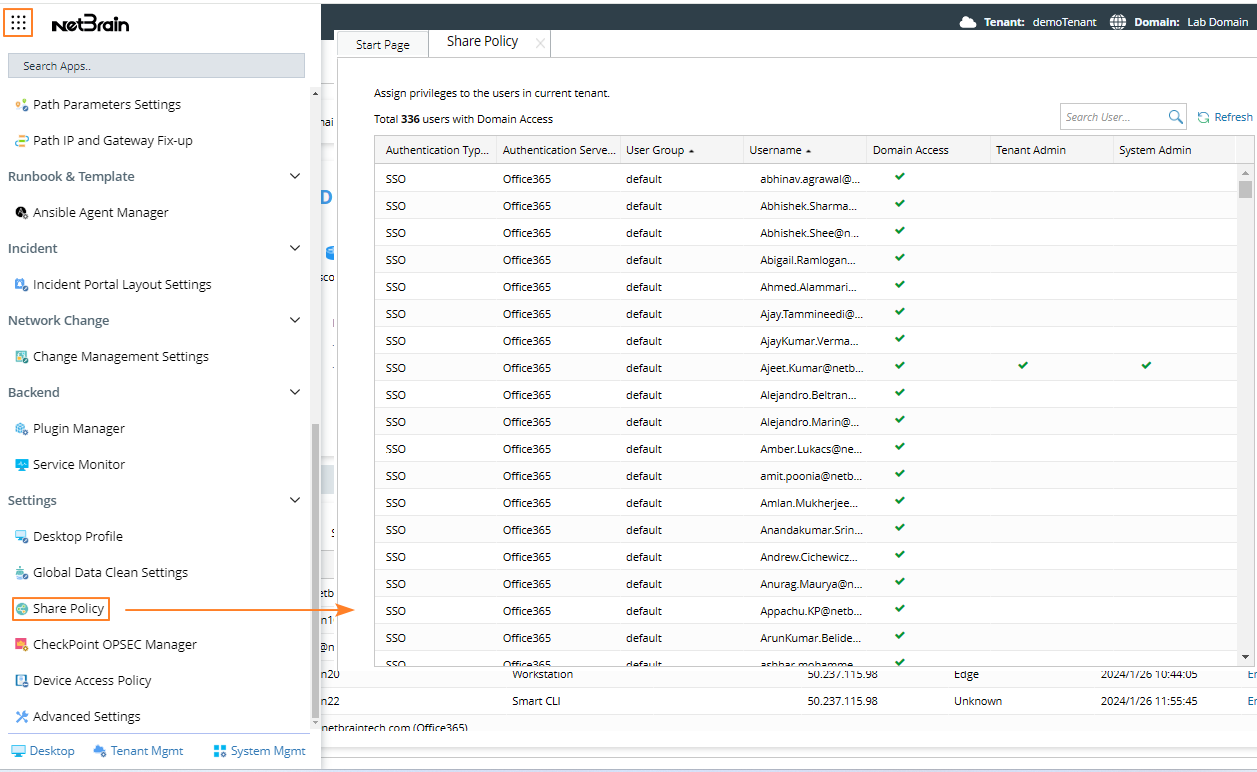
 icon and select Share Policy from the navigation menu on the left. The Share Policy tab lists all users with access to the current tenant.