R12.3-2026Apr21
General Workflow for Configuring API Servers
Configure external API servers in NetBrain to enable device discovery through API-based integration. This workflow provides a generic method to add and manage API servers for supported vendors.

|
Note: Access to the API Server Manager requires the Domain Management role. Ensure you have the appropriate permissions assigned before performing this procedure. |
Use this procedure to configure an external API server directly from the API Server Manager.
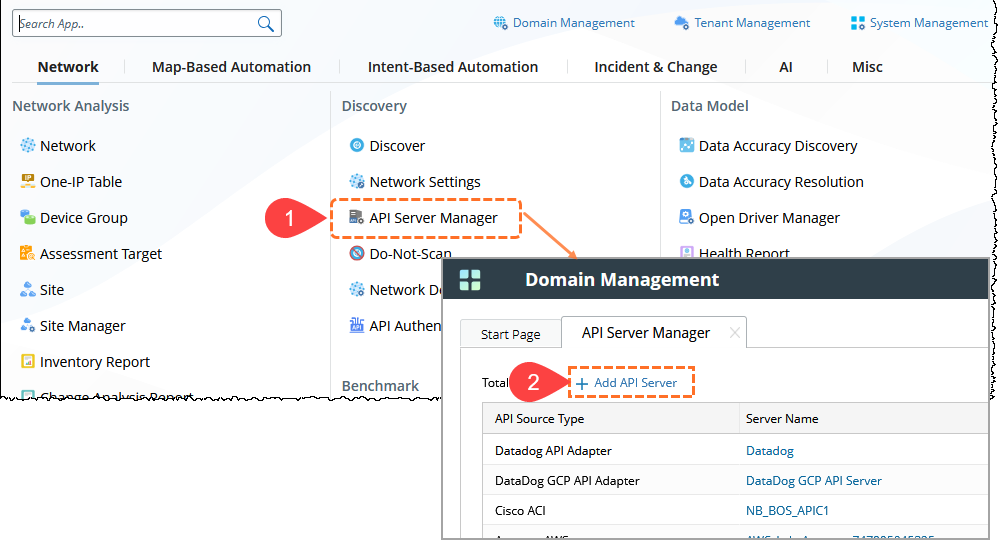
- In the NetBrain Desktop, click Main Menu and open the API Server Manager.
- In the API Server Manager window, click + Add API Server.
- In the Add External API Server window, configure the basic settings:
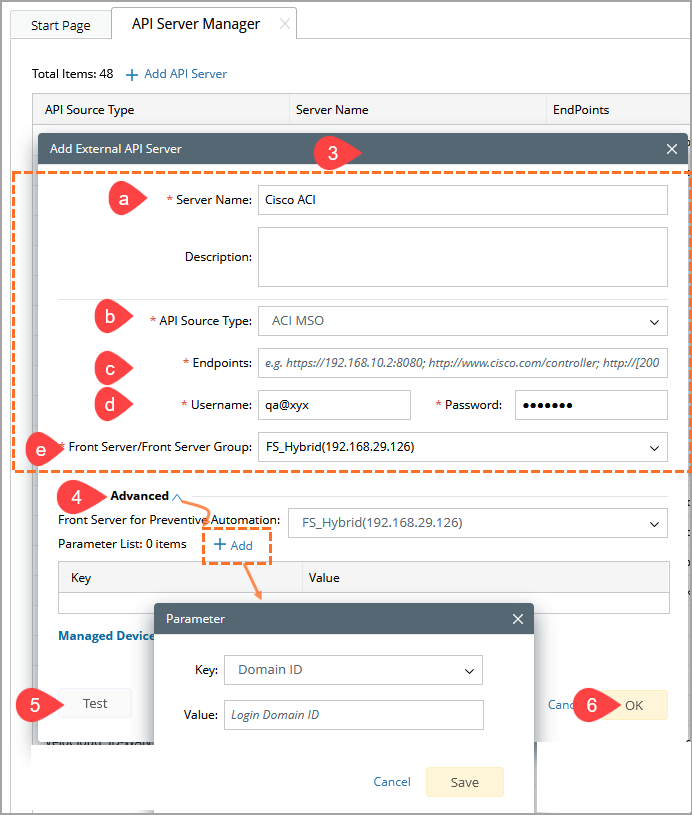
- Enter a unique Server Name and an optional Description.
- Select the appropriate API Source Type from the drop-down list.
- Enter the Endpoints (API URL provided by the vendor).
- Provide the required authentication details (such as API key, token, username/password, or other credentials, depending on the vendor).
- Select a Front Server/Front Server Group that can access the API endpoint.
-
Expand the Advanced section, then click Add to configure additional parameters as key-value pairs (for example, custom headers, rate limits, or vendor-specific settings).
Note:
- Parameter keys and values are case-sensitive and must match the vendor’s API requirements.
- Some APIs require additional headers (for example, API keys) to be configured in this section.
- Click Test to verify connectivity between the Front Server and the API endpoint.
- Click OK to save the API server configuration.