API Authenticator is defined in the “API Authenticator” pane at domain level. The system supports three types of authenticating methods (API Key, Basic Auth, OAuth 2.0). The definition UI will change according to the method chosen.
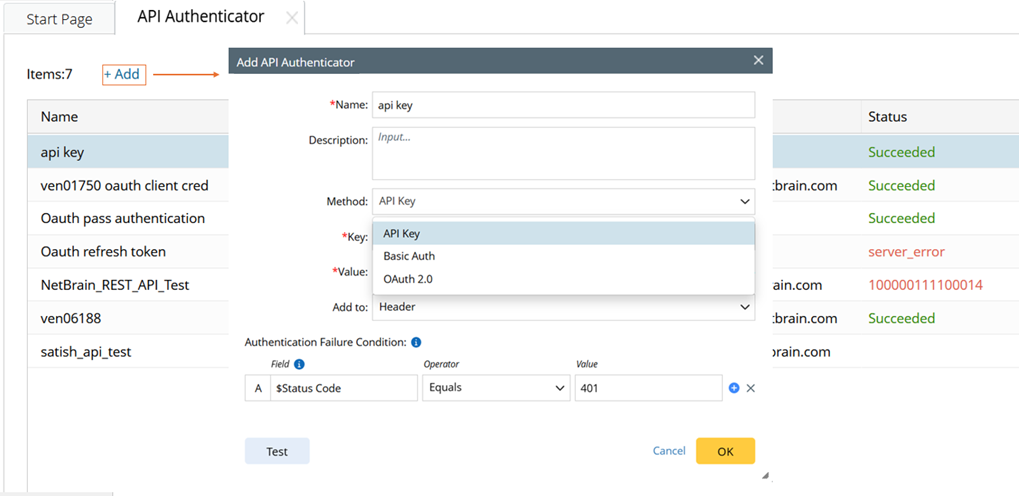
The following table lists how to configure for each method.
| No | Authentication Method | Description | Image
|
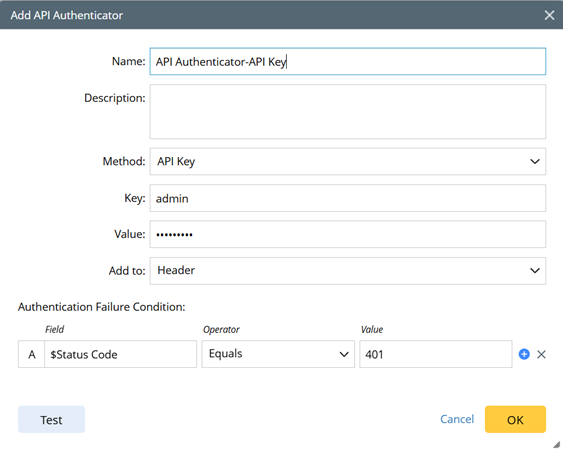
| 1 | API Key | API Key authentication verifies the identity of the requester using API key. The following settings are made to configure an API Authenticator using the API Key method. - Name/Description: Define these basic information
- Key: Specify key name
- Value: Specify key value. The key value can be changed.
- Add to: Define the location where the key is sent, Header or Query Params (the parameters in URL, such as url?a=1&b=2.
- Define the conditions for determining authentication failure: Status code, body, header are used to define the filter condition.
|  |
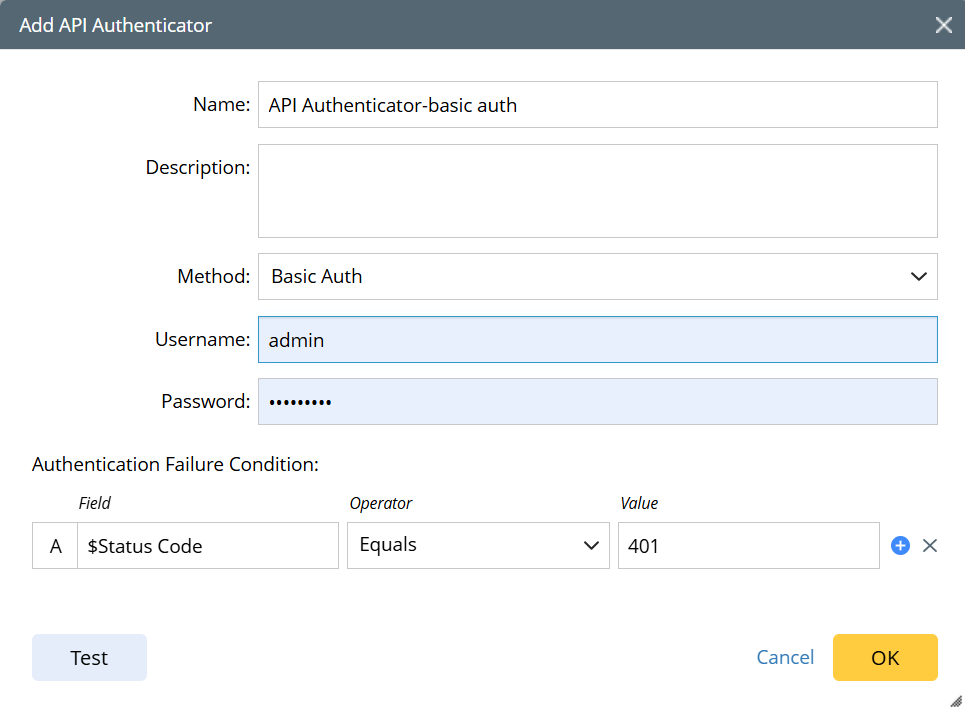
| 2 | Basic Auth | Basic Authentication is a username and password–based authentication mechanism. The following settings are made to configure an API Authenticator using the Basic Auth method. - Name/Description: Define these basic information.
- User Name/Password: Specify the username and password used for authentication
- Define the conditions for determining authentication failure.
|  |
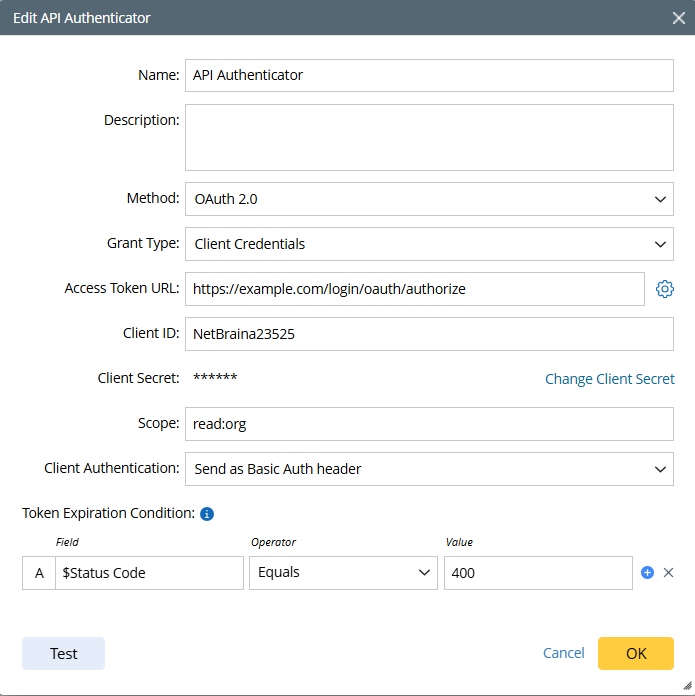
| 3 | OAuth 2.0 (“Client Credentials” grant type) | If OAuth 2.0 is the Authenticator method, “Client Credentials” is a supported Grant type. The following settings are made to configure API Authenticator with this Grant type: - Name/Description: Define these basic information.
- Access Token URL: The endpoint for authorization used to get access token. Tokens are usually short-lived.
- Client ID: The client identifier issued to the client during the Application registration process.
- Client Secret: The client secret issued to the client during the Application registration process.
- Scope: The token contains or is associated with approved scopes. Access is controlled by scopes by checking if the client is allowed to request those scopes. The scope of the access request may have multiple space-delimited values.
- Client Authentication: Select a way to send authentication credential (Send as Basic Auth Header/ Send client credentials in body)
- Token Expiration Condition: Define the conditions for determining token expiration. Status code, body, header are used to define the filter condition.
|  |
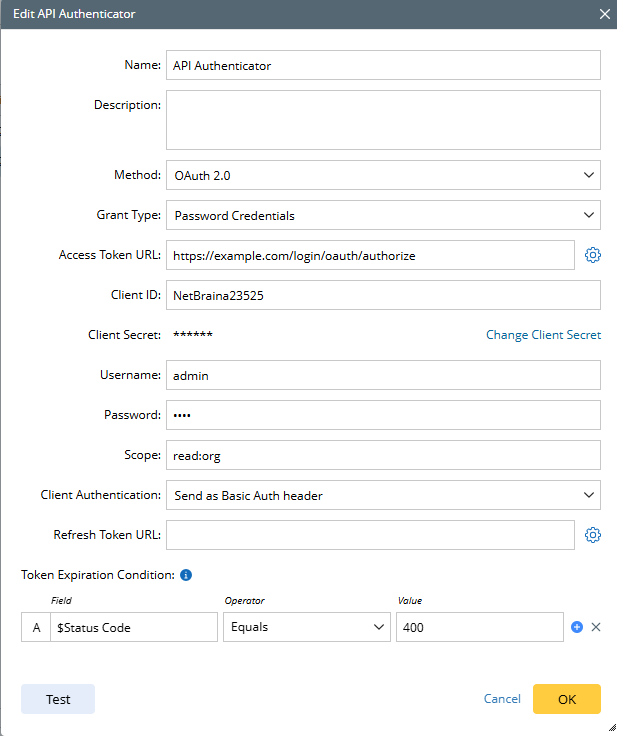
| 5 | OAuth 2.0 (“Password Credentials” grant type) | If OAuth 2.0 is the Authenticator method, “Password Credentials” is a supported Grant type. The following settings are made to configure API Authenticator with this Grant type: - Name/Description: Define these basic information.
- Access Token URL: The endpoint for authorization that is used to get access token.
- Client ID: The client identifier issued to the client during the Application registration process.
- Client Secret: The client secret issued to the client during the Application registration process.
- Username/Password: Username/Password for identity authentication.
- Scope: Scope defines what permissions the access token will grant. The scope of the access request may have multiple space-delimited values.
- Client Authentication: Select a way to send authentication credentials (Send as Basic Auth Header/ Send client credentials in body).
- Refresh Token URL: Uses this endpoint to exchange the refresh token for an access token. If empty, it will use the access token URL instead.
- Token Expiration Condition: Define the conditions for determining token expiration. Status code, body, header are used to define the filter condition.
|  |
| 6 | OAuth 2.0 (“Refresh Token” grant type) | If OAuth 2.0 is the Authenticator method, “Refresh Token” is a supported Grant type. The following settings are made to configure API Authenticator with this Grant type: Name/Description: Define these basic information. Client ID: A public identifier assigned to the application when it is registered with the OAuth authorization server.Client Secret: A confidential value known only to the application and the authorization server, used to prove the client’s identity.Refresh Token: Specify a refresh token for authentication. The refresh token is used to renew an expired access token while preserving the user’s session.Scope: Scope determines the permissions of the refreshed access token and can only stay the same or be reduced from the original authorization. The scope of the access request, which may have multiple space-delimited values.Client Authorization: Select a way to send authentication credentials (Send as Basic Auth Header/ Send client credentials in body).Refresh Token URL: Uses this endpoint to exchange the refresh token for an access token. If empty, it will use the access token URL instead.Token Expiration Condition: Define the conditions for determining token expiration. Status code, body, header are used to define the filter condition. | 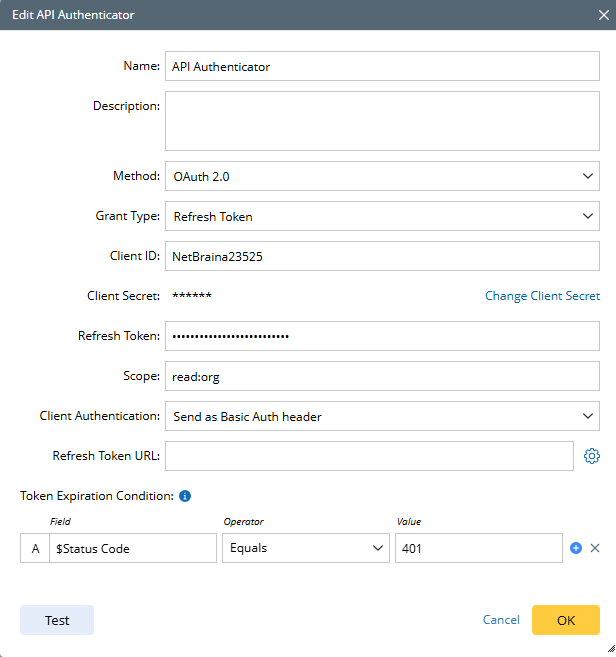 |
| 7 | OAuth 2.0 (“Authorization Code” grant type) | If OAuth 2.0 is the Authenticator method, “Authorization Code” is a supported Grant type. The following settings are made to configure API Authenticator with this Grant type. - Name/Description: Define these basic information.
- Auth URL: The endpoint for authorization server that is used to get the authorization code.
- Access Token URL: The endpoint for authorization that is used to get access token.
- Client ID: A public identifier for the application that is used to tell the server which application is requesting authorization.
- Client Secret: A confidential value that is used to prove the application’s identity.
- Scope: Scope specifies what resources and actions the client application can access after the user authorizes it. The scope of the access request may have multiple space-delimited values.
- State: An opaque value that is used for preventing cross-site request forgery.
- Client Authentication: Select a way to send authentication credentials (Send as Basic Auth Header/ Send client credentials in body).
- Refresh Token URL: Uses this endpoint to exchange the refresh token for an access token. If empty, it will use the access token URL instead.
- Token Expiration Condition: Define the conditions for determining token expiration. Status code, body, header are used to define the filter condition.
|  |
| 8 | OAuth 2.0 (“Authorization Code with PKCE” grant type) | If OAuth 2.0 is the Authenticator method, “Authorization Code with PKCE” is a supported Grant type. The following settings are made to configure API Authenticator with this Grant type. - Name/Description: Define these basic information.
- Auth URL: The endpoint for authorization server that is used to get the authorization code.
- Access Token URL: The endpoint for authorization that is used to get access token.
- Client ID: A public identifier for the application that is used to tell the server which application is requesting authorization.
- Client Secret: A confidential value that is used to prove the application’s identity.
- Code Challenge Method: The code challenge method defines how the code challenge is derived from the code verifier. Two code challenge methods are offered: SHA-256 and Plain. SHA-256 Is the recommended code challenge method.
- Code Verifier: The code verifier is a secret generated by the client and later used to prove that the same client is exchanging the authorization code, protecting against code interception attacks. User can input code verifier (A random 43-128 character strings), otherwise the system will automatically generate one.
- Scope: Scope specifies what resources and actions the client can access after the user authorizes it. The scope of the access request may have multiple space-delimited values.
- State: An opaque value that is used for preventing cross-site request forgery.
- Client Authentication: Select a way to send authentication credentials (Send as Basic Auth Header/ Send client credentials in body).
- Refresh Token URL: Uses this endpoint to exchange the refresh token for an access token. If empty, it will use the access token URL instead.
- Token Expiration Condition: Define the conditions for determining token expiration. Status code, body, header are used to define the filter condition.
|  |