R12.3-2026Apr21
Defining an External Approval Request
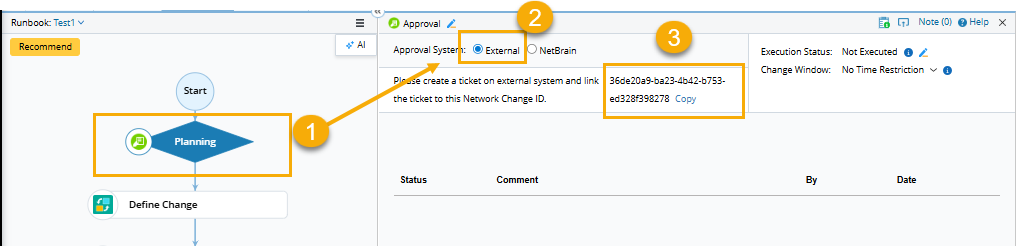
- Select the Planning node in the runbook.
-
In the Approval pane, select External in the Approval System field.

Note: If the External option is disabled, see Approval Settings for how to adjust the approval option. -
Click Copy to copy and paste the runbook ID. The ID will be used to link with a ticket in an external system, thus building a connection with the Approval node in the external system for status synchronization.
- Create a change ticket in the external system and customize two fields in the ticket to save the Change Management ID and the returned NetBrain URL.
- Create a business rule to define ticket and network change task status mapping and API calls in the external system. The rule mainly covers the following components:
- How to access your domain.
- Map ticket state and Change Management status.
- Bind ticket ID to Change Management ID.
- Call NetBrain API to Set Change Management Status when the ticket state changes.
Example: Define Status Mapping and API Calls in ServiceNow.
Code |
|