R12.3-2026Apr21
Discover Other Resources
Follow these steps to discover AWS other services resources except networking services via APIs:
- Log in to your NetBrain system.
- Click the Schedule Task link from the Domain Management page.

- Right Click “Basic System Benchmark” and select “Edit”.

- Click “Batch Definition” and click “Build-in Data”. Select “Other Resources” for Microsoft Azure or Amazon AWS or Google Cloud. On the right-side menu, select all or specific cloud service nodes name which want to be discovered.

- Right Click “Basic System Benchmark” and select “Run Now” to execute the benchmark task to discover the selected services. Meanwhile all the benchmark tasks will be executed.

- After the Benchmark task in Step 5 completed, right click “Basic System Benchmark” and select “View Result” to check the resources discovery result.

- Click “Device Log”
 icon to view the result.
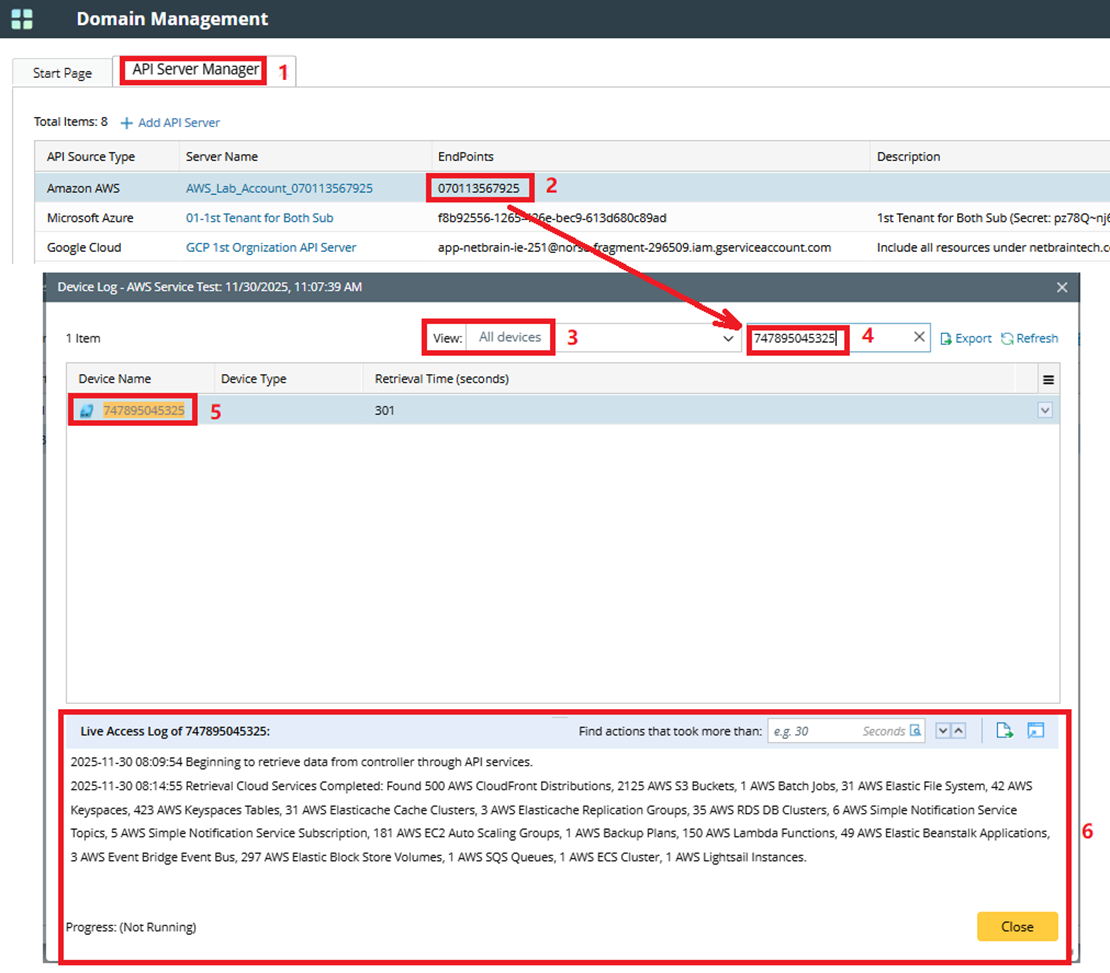
- Use the API server Endpoint to search in “Device Log” search bar. Modify the view mode to “All devices”. Click the found device name. Check the “Live Access Log” to view the other resources discovery result