The system accesses Azure through either Managed Identity or Service Principle and uses Rest APIs to retrieve the data from Azure.
To enable the the system to retrieve the Azure data, you need to:
- Create a Custom IAM Role
- Access APIs (you can select option a or b)
- Set Up VM Identity (for Managed Identity)
- Register App (for Service Principle)
- Assign Subscription Role
- Set up API Server

|
- To collect data from Azure successfully, NetBrain Front Server must have access to *.core.windows.net, *.azure.com, *.microsoft.com, and *.microsoftonline.com.
- The minimum resource unit for an API Server scope is a subscription that includes all the resources under it. Therefore, NetBrain does not recommend separating resources under one subscription to a different API Server.
- The API Server is associated with an AD Tenant. Use IAM to control the subscription level of resources API discovery. If you have multiple AD Tenants, set up at least one API Server for each AD Tenant.
- If you need to include/exclude specific VNets for discovery, refer to Azure Include and Exclude VNets Discovery. If you have mass VNets used for include/exclude VNets discovery and wants to retrieve the discoverable VNet information efficiently, refer to Azure Discoverable VNets Information Exporter.
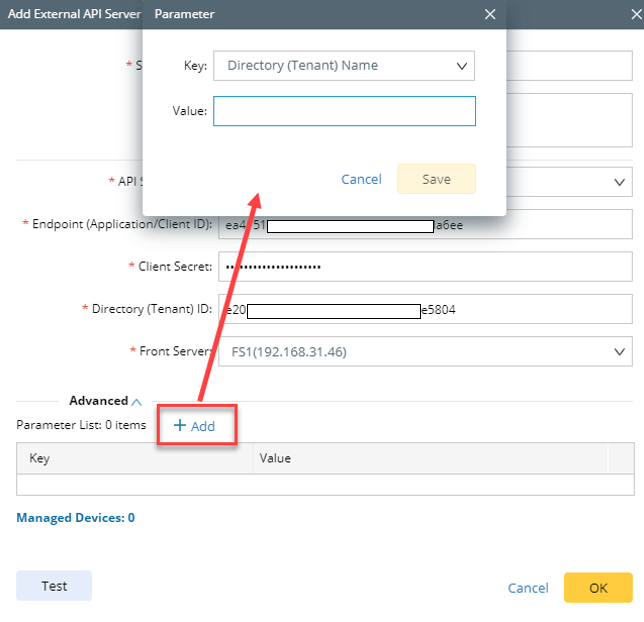
- NetBrain does not retrieve tenant details (including tenant name) using Azure Management APIs but instead creates a random tenant name. However, as below, you can manually define your Tenant Name in the API server manager:
If you just want to discovery specific VNet due to license limitations, please refer to Azure VNet include/exclude discovery feature.
|