R12.3-2026Apr21
Unbind Subscription License
Each subscription license is bound with the machine where it is activated. If you want to transfer or migrate the license to another server, you need to unbind it from the current machine and the License Server.
- Log in to System Management Page.
- In the System Management page, go to the License tab, and then click Unbind.

- In the Unbind Subscription license dialog, select Online or Via Email method.
- Online: Unbind it from both your local machine and the License Server synchronously.
- Enter your License ID, Activation Key, and Email Address.
- Click Unbind.
Click Close on a notification dialog box. A new activation key will be sent to your specified email address.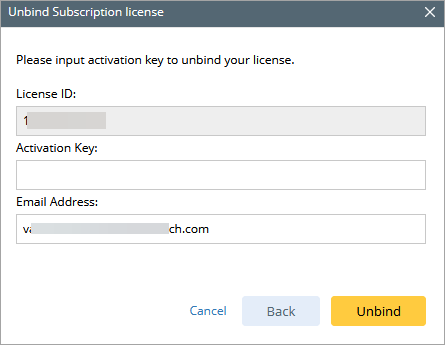
- Via Email: Click Unbind to send a license unbinding request to the NetBrain Engineer.
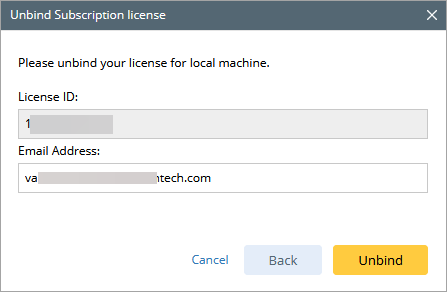

Note: If your Web/Web API Server is not allowed to access the Internet, you can unbind the license from your local machine first and then send the unbind file to the Support Team to unbind it from the License Server. - Enter your License ID and Email Address.
- Click Unbind. The netbrain.Unbind file will be generated and downloaded. If the unbind file cannot be downloaded as expected, click Generate Unbind File to download.
- Send an email to the Support Team with the file attached. Our support team will help remove your license information from the License Server.
- Online: Unbind it from both your local machine and the License Server synchronously.