R12.3-2026Apr21
Use Private OpenAI API Key
If users decide to use OpenAI as the LLM model but prefer to use their own API key, the following configurations are required.
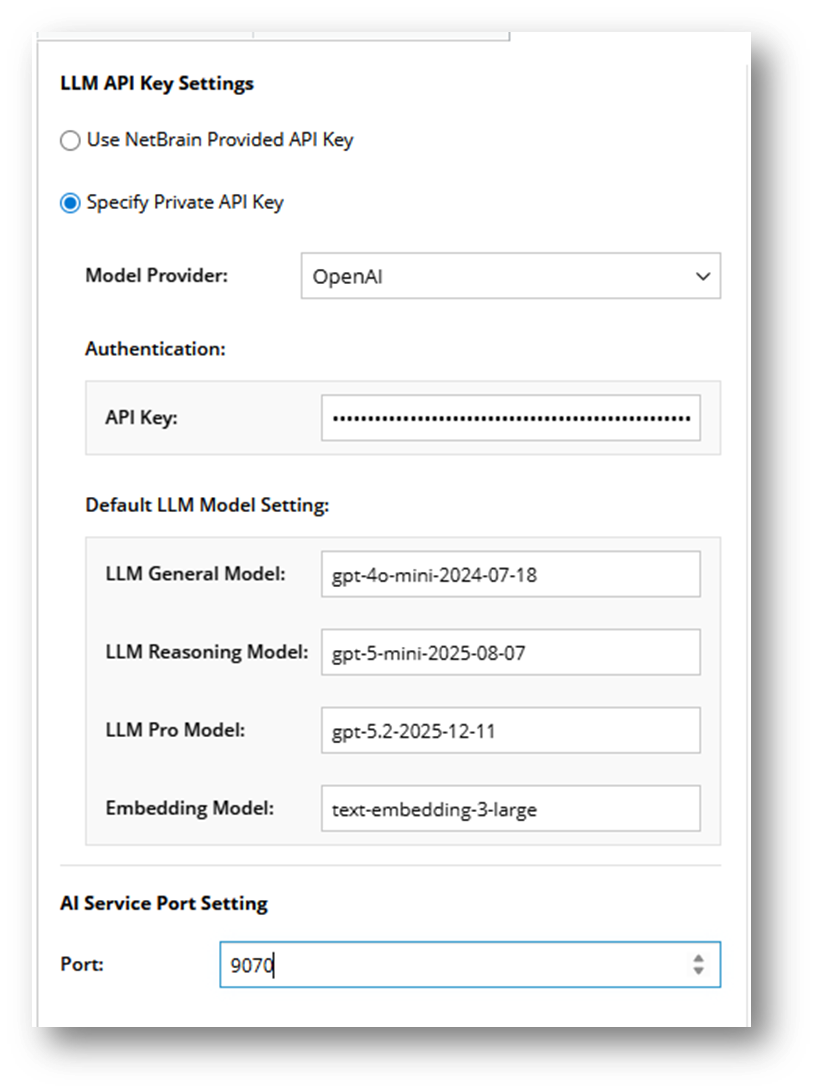
- Select Specify Private API Key.
- Select OpenAI as Model Provider.
- Authentication. Input user’s private API key.
- Default LLM Model Setting. This setting applies to all features by default. Please note that changing the embedding model will delete all existing embedded data, which will then need to be re-embedded. Users can manually enter the models.
LLM Model Default Value LLM General Model gpt-4o-mini-2024-07-18 LLM Reasoning Model gpt-5-mini-2025-08-07 LLM Pro Model gpt-5.2-2025-12-11 Embedding Model text-embedding-3-large

|
Note: Please ensure the Web API Server can access the URL https://api.openai.com. |