R12.3-2026Apr21
Assigning Values to RBT Nodes Using Variables
Configure an RBT (Runbook Template) assigning values to each node using variables as follows:
- You can define a name for each node. This field supports the all types of template variable. When the runbook is initialized, the variable in the node name will be automatically replaced with its actual value.
-
For each node, select which parameters should be assigned values via variables. By default, the Target Devices item (if present) is automatically selected and assigned to the _TargetDevices variable.
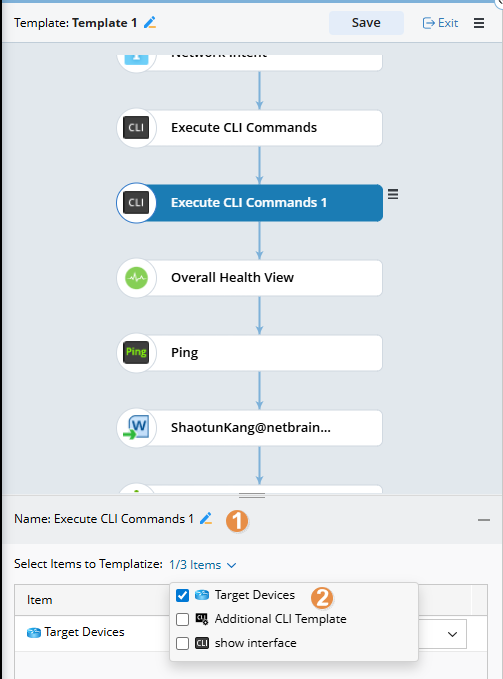
-
Template variables can be used to assign values to parameters that have been previously selected. Both the variables and columns of table-type variables can be used.

Note: The table variable as a whole cannot be directly assigned; only its columns can be used. - When assigning values to the Execute CLI Commands node using table variables, you must use only one table. Assigning values from multiple tables is not supported.
The following items in each node will be converted into template variables.
| Node Type | Item to Be Templatized |
| Execute CLI Commands |
|
| Compare |
Compare Same Device:
Compare Two Devices:
|
| Retrieve Live Data |
|
| Ping |
|
| Traceroute |
|
| Data View Template |
|
| Run Qapp |
|
| Run Gapp |
|
| Path |
Unicast:
Multi Cast:
|
| Verify Application | N/A |
| Free Text | N/A |
| Ansible Task |
Target Device Hostvariable1 Hostvariable2 |
| Define Change | Target Device |
| Planning | N/A |
| Other Change | N/A |
| Execute | N/A |
| Document | N/A |
| Intent |
|
| Insight |
|