This Feature
In this node, you will create a new Golden Feature by specifying its Name, Description and selecting the Target Devices. You can also view the Associated Golden Intents and Operation History.
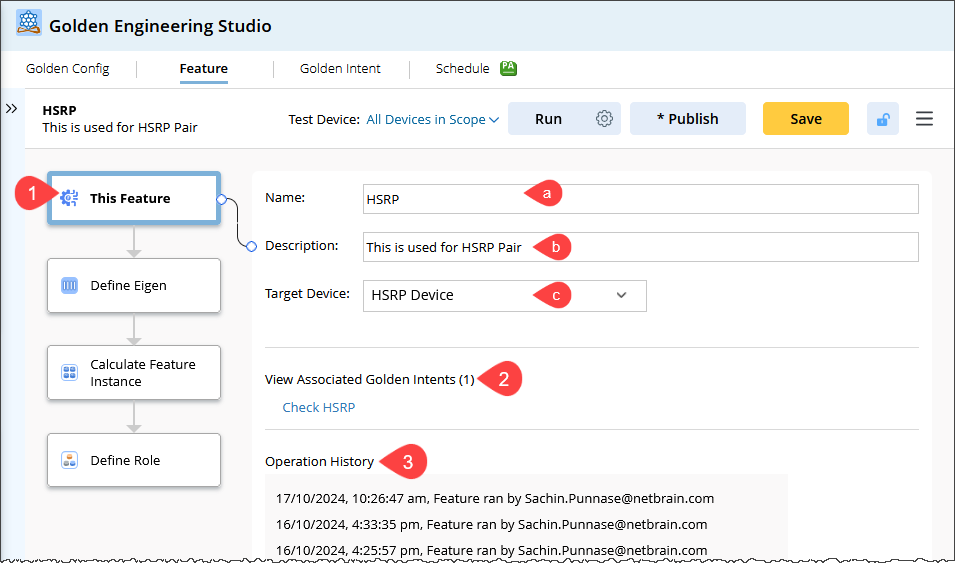
In this example, you will create a feature for HSRP devices.
- In the This Feature node, provide the following basic information:
-
Name: Enter the name of the feature. Feature names must be unique within the same folder.

Note: Features within the same folder cannot have duplicate names.
-
Description: Enter a brief description of the feature.
-
Target Device: Choose the target device. You can select from a predefined Device Group using the dropdown menu or select All Network for broader applicability.
The Target Device approach depends on the network feature you intend to decode:
- For network features configured on all devices (e.g., SNMP, Password, Telnet/SSH), select All Network as the target.
- For network features configured on a specific subset of devices, using a dynamic or static device group offers easier maintenance and better performance.
-
- View Associated Golden Intent.
This section displays all Golden Intents which use the current GF. Click the Golden Intent link to open the GI Manager to see the details of the GI, including its specific definition.
- View Operational History of GF.
The following types of operational information are available for the GF:
- Displays the creator and the creation date.
- Displays who performed the Run operation and the Calculate Role operation, along with the corresponding timestamps.
- Displays who executed the Publish operation and when it occurred.
- Displays who performed the Load Setting operation and the time it was executed.
Note: During Export/Import or Save As operations, the operation logs from the original Feature will not be transferred to the new feature.