10.1.9 JA Publication
Define Intent Replication Settings for NITs Without Macro Variables
For the system to create cloned intent via the intent template (without using macro variables), you must define the following settings:
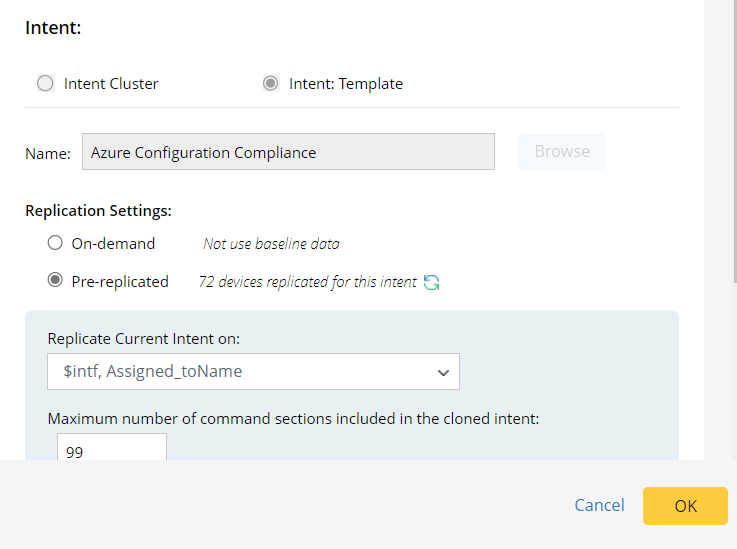
-
Name: The name field will be populated with the selected intent template name (for example, intent template Azure Configuration Compliance).
- Replication Settings: Define replication mode for replicating intents from the intent template.
- On-demand: Retrieve live data to test and replicate intent.
- Pre-replicated: Use pre-decoded device data to replicate intent. The number of devices for replicating intent is displayed.
-
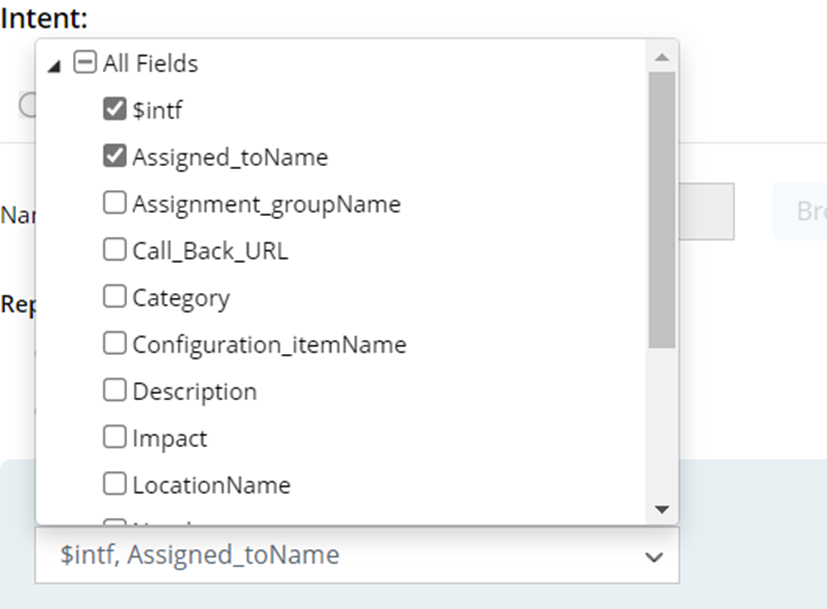
Replicate Current Intent on: Select data fields (e.g., $intf, Assigned_toName) of the selected incident type to define what devices will be used as incident devices, in other words, the problem devices. The incident device will be extrapolated from the data field(s) of the selected incident type.
- Maximum number of command sections included in the cloned intent: Input a number (the default value is 99), which is the maximum number of command sections in the cloned intent. This is for limiting the command sections in the cloned intent to make the replication process faster.