10.1.9 JA Publication
Define Which ADT Intent to be Executed
Example: Select ADT Interface Down.
Some intents are associated with ADT assets, which can be executed to address interface error issues. Then, we add the ADT for triggered automation and filter useful ADT intents to check and solve interface error.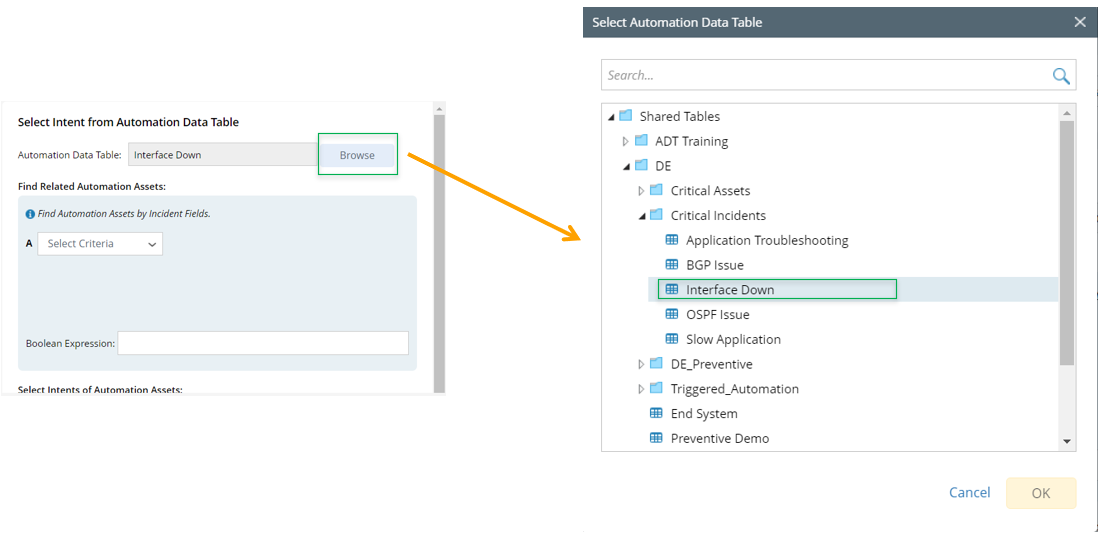
- Click Browse and select ADT Interface Down. Click OK.
- Define the condition so the system can run the ADT intent related to the incoming incident.

Note: If no condition is defined, then NO ADT intent will be triggered.
- Select the ADT Assets, such as Device.
- Select the operator, such as Contains, and the data field of the incoming Incident as device_name.
Device contains device_name means the ADT device can be matched if any ADT device’s name contains the value of data field device_name. For example, if the device_name is CA-TOR-R, this ADT assets can be matched because one ADT’s device name is CA-TOR-R1. If you want to match exactly, you can use the operator Matches. - Define Boolean Expression as A or B.
- Select intent of ADT assets so the system will run the intents.
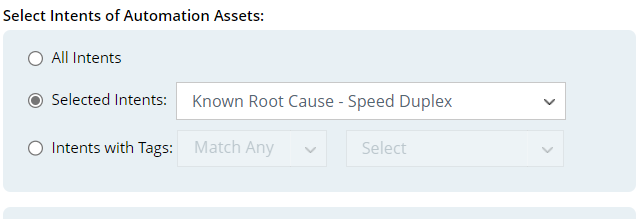
Three options are provided for selecting ADT intents.
- All Intents: All ADT intents are triggered to run.
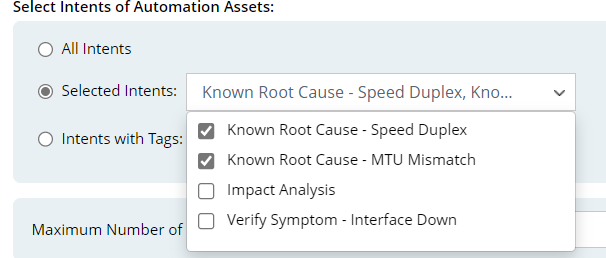
- Selected Intents: Select several intents to run. In this examples, two ADT intents (Known Root Cause – Speed Duplex and Known Root Cause – MTU Mismatch) are selected.
- Intents with Tags: Select tags to find intents having matched tags.

- Click OK to save triggered automation for ADT.