2023-Nov-03-R11.1a
Create an SNMP Parser
This section introduces how to create an SNMP Parser to extract key metrics of device data with OIDs.
Example: Parse the free and used memory of a Cisco Router with the corresponding OIDs.
- Keep the default Traditional Devices node type and select Cisco Router from the Device Type list. By default, the All Device Types option is selected.

Tip: The system also supports defining a Parser to retrieve and parse SDN data through APIs. See Creating an API Parser to get details about API Parser.
- Select SNMP from the Parser Type dropdown menu.
- Select an SNMP method (SNMPGet in this sample) from the dropdown menu.
- Enter the following two OIDs in the Command field and separate them with ||.
- Free memory OID: 1.3.6.1.4.1.9.9.48.1.1.1.6.1
- Used memory OID: 1.3.6.1.4.1.9.9.48.1.1.1.5.1

Note: Only the SNMP method SNMPGet supports multiple OID inputs, while SNMPWalk and SDNMPTable support single OID.
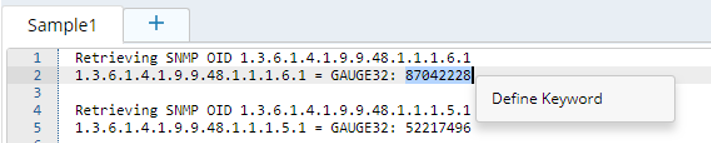
- Highlight the free memory value exactly in the sample data and click Define Keyword in the floating menu. The Keyword Parser dialog prompts with the following fields auto-identified. Click Save Variable.
- Sample — the sample command line where the variable stays.
- Parser — defines keywords and where a variable is located. The keyword Parser GAUGE32: $int:var1$ is created automatically. To locate the variable exactly and differentiate it with the used memory value, modify the Parser to 1.3.6.1.4.1.9.9.48.1.1.1.6.1 = GAUGE32: $int:var1$. It contains the keyword 1.3.6.1.4.1.9.9.48.1.1.1.6.1 = GAUGE32: that always stays the same, and the variable $var1 varies in different devices.
- Variable — the variable defined in the Parser. To change the auto-created variable name to a more meaningful name, rename the variable, such as from var1 to free_memory.
- Highlight the used memory value exactly in the sample data, and then follow step 6 to add the variable used_memroy.
Note: In the Parser field of the Keyword Parser dialog, modify the default Parser to 1.3.6.1.4.1.9.9.48.1.1.1.5.1 = GAUGE32: $int:var1$, and rename the variable name as used_memory.
- Click Save on the upper right corner of the page. The Parser will be saved in the Parser Library.
Note: SNMP Parser has two special built-in SNMP parameters: $cpu_oid and $mem_oid, representing a device's CPU and memory usage, respectively. When you use these two parameters in the Command field, select a device to retrieve data, and the system will automatically get the CPU usage and memory usage by looking up the corresponding OID of the device in the domain. 
See also: