2023-Nov-03-R11.1a
Device Scope
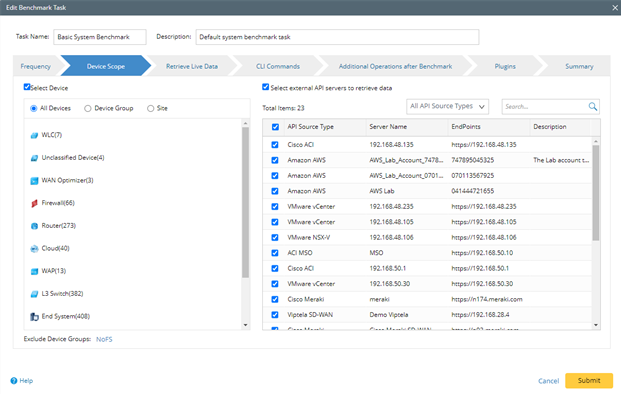
Specify the device scope to execute the benchmark task.
- Select Device — applicable for traditional networks.
- All Devices — select all devices in the domain.
- Device Group — select devices by Device Group. You can use device groups to select devices that match certain criteria.
- Site — select devices by Site. You can use Site to select devices by geographical grouping.
- Exclude Device Groups — exclude groups of devices from the selected devices above to further refine the device scope.
- Select external API servers to retrieve data of SDN nodes — applicable for SDN network. Select API Servers from the list to retrieve the data by API. The servers could be filtered by API source types to help find the target servers.
- Recommended Settings:
- For medium or small networks, it is recommended to schedule a daily System Benchmark for all devices in the domain.
- For large networks or devices with a large amount of data, it is recommended to separate the task into multiple Benchmarks, each with different device scope and customized frequency. Ensure that all devices are covered in these tasks to keep the domain updated. Otherwise, using one Benchmark to collect all data may take a long time and conflict with other tasks.