R11.0a-March2023
Define Member Devices of Cloned Intent
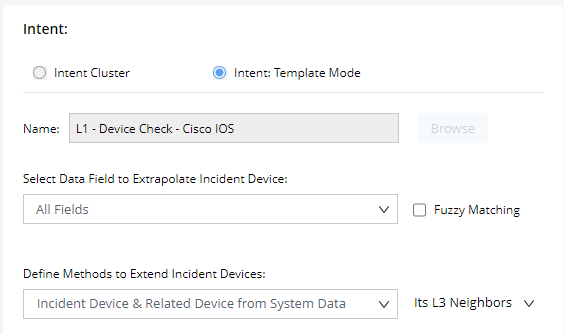
For the system to create cloned intent via the template, you must define the devices to be cloned. There are 2 settings:
- Select Data Field to Extrapolate Incident Device: To define what devices will be used as incident devices, in other words, the problem devices. The incident device will be extrapolated from the data field(s) of the selected incident type.
- Uncheck fuzzy matching: Using device name within NetBrain to extrapolate incident device. For example, if there is a device US-BOS-R1 within NetBrain, the incident device US-BOS-R1 can be extrapolated if the data field value is US-BOS-R1. However, no incident device can be extrapolated if the data field value is US-BOS-R1 has a problem.
- Check fuzzy matching – Using Hash Tag #_device to extrapolate incident device. For example, there is an entry of primary tag of Hash Tag #_device is US-BOS-R1, the incident device US-BOS-R1 can be extrapolated from either the data field value US-BOS-R1, or US-BOS-R1 has a problem.
- Define Methods to Extend Incident Devices: define other member devices of cloned intent besides the incident devices. The intent library provides 3 different methods:
- Incident device only – Using the extrapolated incident device only as member devices
- Incident device & related device from system data – using the extrapolated incident device and its related device as member devices. There are 4 ways to define the related device, including:
- In the same VLAN group
- In the same subnet
- L3 neighbor
- L2 neighbor
- Incident device & related device from NCT table – using the extrapolated incident device and its related devices from NCT table as member devices. You can select an NCT table and a column to find the related device.
Example:
- Select All Fields in Select Data Field to Extrapolate Incident Device
- Select Incident Device & Related Device from System Data in Define Methods to Extend Incident Devices.
- Click Select Data to select Its L3 Neighbors.