R11.0a-March2023
Define Which Member NIs to be Executed
Example: Select intent cluster Check Related Applications.
Three intents are created and inserted with a specific intent map and using ping from the first hop device to the destination as the diagnosis. Then, we add these intents into the NIC Check Related Application for defining triggered automation to verify application reachability.
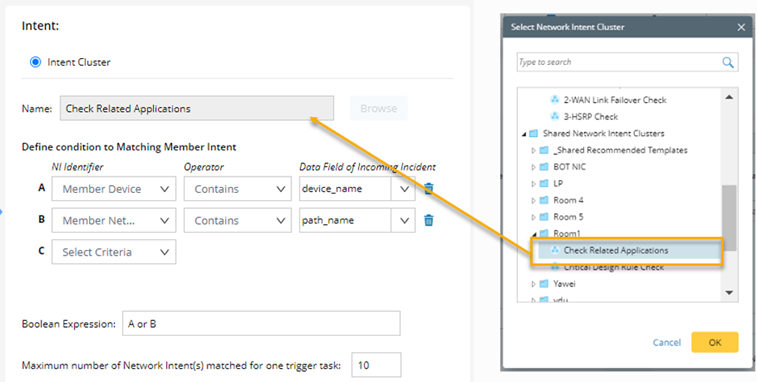
- Click Browse and select Check Related Applications. Click OK.
- Define the condition so the system can run the member NIs related to the incoming incident.

Note: If no condition is defined, then NO member NI will be triggered. - Select the NI identifier, such as Member Device.
- Select the operator, such as Contains, and the data field of the incoming Incident as device_name.
Member device contains device_name means the member intent can be matched if any member device’s name contains the value of data field device_name. For example, if the device_name is CA-TOR-R, this intent can be matched because one member device name is CA-TOR-R1. If you want to match exactly, you can use the operator Matches. - Define Boolean Expression as A or B.
- Define the Maximum number of Network Intent(s) matched for one trigger task, such as 10.
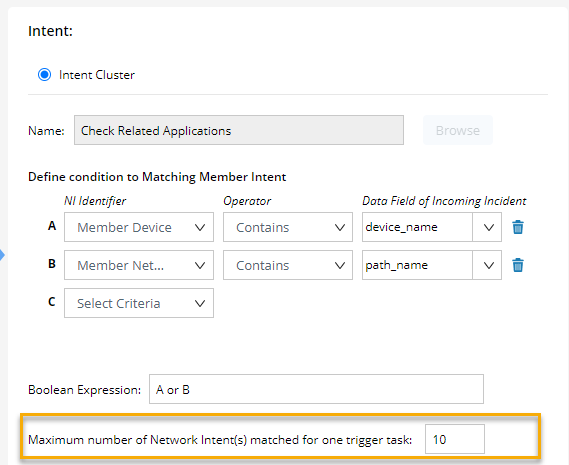
This option determines the maximum intents that can be matched for one trigger. Setting the number as 10 means up to 10 intents can be matched. If you want to match only one intent, you can set the number as 1. - Click OK to save triggered automation.