Do-Not-Scan List

Contents
Before discovering a network, you can create a Do-Not-Scan list to specify the IP addresses, subnets, or device types that you do not want to discover in your network. Consequently, the related devices is ignored during the discovery process.
By default, the following device types are selected in the Do-Not-Scan list.
▪IP Phone
▪LWAP
▪Cisco Meraki AP
▪Cisco Meraki Cloud
▪Cisco Meraki Firewall
▪Cisco Meraki Switch
Adding Do-Not-Scan Devices
1.Log in to the Domain Management page.
2.Click the  icon in the upper-left corner of the page and select Do-Not-Scan.
3.In the Do Not Scan tab, select either way or both to add do-not-scan devices.

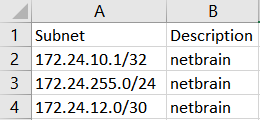
1)Click Add. ▪To specify a host, enter the IP address and 32 in the Subnet Mask field. ▪To specify a subnet, enter the subnet address and the bits of the subnet mask, such as 172.24.101.0 and 24. 2)Enter a description according to your needs. 3)Specify the Source Technology through which you do not want the Discover to be performed by clicking the hyperlink next to Source Technology. 4)Click OK. Tip: You can also import a .csv file including the required information from your local folder. Take the following sample for reference: |
In the device type list, select the check boxes of the device types that you don't want the system to discover. |
See also: