Enable Neighbor Pair Replication
Enable the Neighbor pair replication if you want to check the neighbors for consistency via intents. Although you can perform the neighbor check through NIC, a large part of neighbor checks can be implemented through NIT (around 60%) and simplifies the complexity to define the neighbor check. Additionally, NIT can recur to decode and run such logic as needed.
- Open an intent and switch to Edit mode.
-
From the
 menu and select Replication Settings.
-
By default, the window will open in Intent Replication Logic Settings tab. Check the selection box Enable Neighbor Pair Replication.
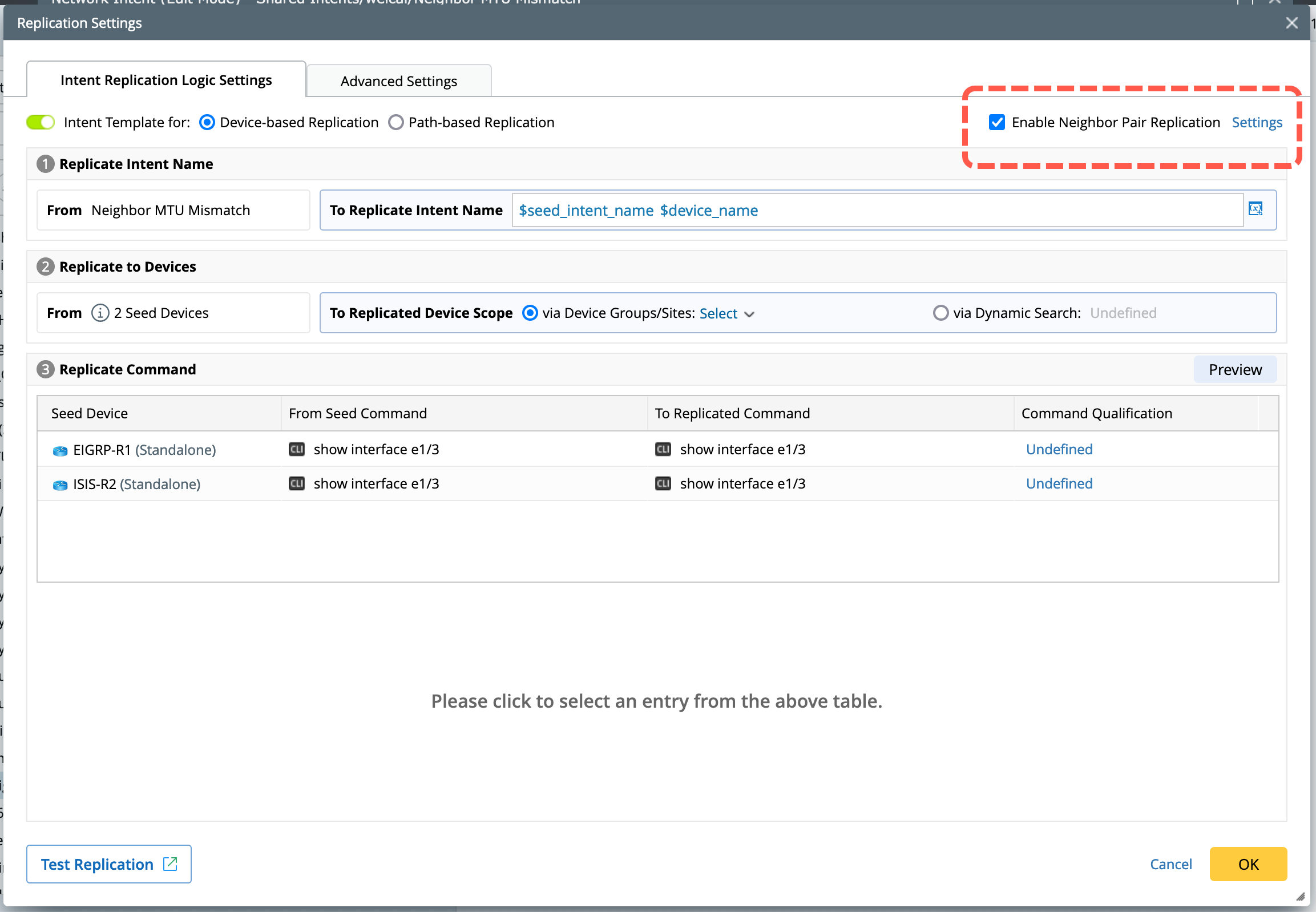
The following image indicates the seed intent details with neighbor replication logic enabled. This example uses MTU mismatch as a network scenario to explain:
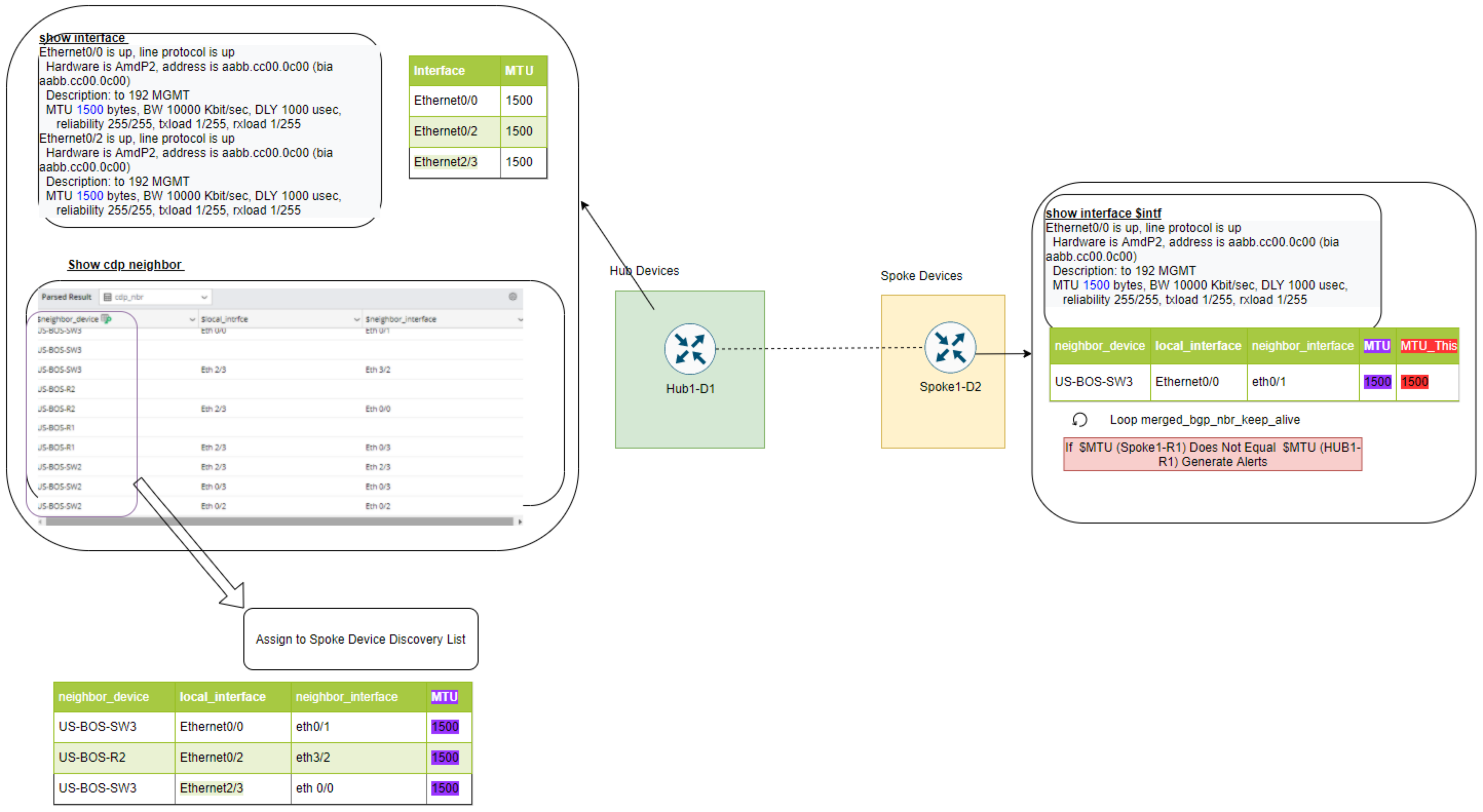
Key concepts within the NIT neighbor replication logic are as follows:
-
Device Role: Devices within the seed intent can be defined as Hub device role or Spoke device role, with the key differentiations as follows:
- At the Hub device, define the logic for calculating neighbor devices (spokes) and hub parameters, which will be passed to spoke devices through a neighbor table.
- At the spoke device, define the logic for the interactions between the hub and spoke devices, which will be duplicated for each row in the neighbor table.
- Neighbor Table: Neighbor tables are used to discover the neighbor devices for the hub and optionally pass parameters that can be used for spoke devices.
- Device Macro Variable: Hub and spoke devices may use macro variables as parameters of show command to compare, and these parameters can come from the neighbor table for comparison.
Replication Logic
With the seed intent defined, if this seed intent is used to replicate on an incoming device “R1” which has two neighbors from the neighbor table, the following explains how the cloned intent is created.

-
Qualify Devices: The device qualification defined in NIT is used to match the hub devices and normal devices, but not to spoke devices.
With “R1” as an incoming device, it will examine the NIT’s qualification and see whether it matches the definition. -
Decode Hub Devices: Decode the hub devices and normal devices automatically.
With “R1” as an incoming device, it will use Hub1-D1 to see whether Hub1-D1 matches and can be used to decode “R1”. -
Discover Spoke Devices: If the hub devices are successfully decoded, their corresponding spoke devices will be discovered according to the decoding results of the hub devices.
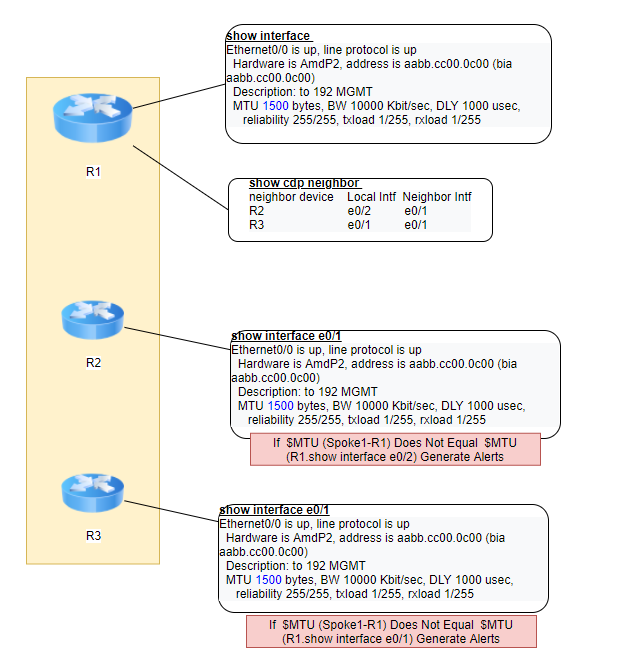
As “R1” is matched with the hub device, users can use the command “show cdp neighbor” to find 2 neighbors for the spoke device (“R2” and “R3”). -
Decode Spoke Devices: If spoke devices are successfully discovered, they will be decoded. The hub device and its spoke device exist in pairs, forming a dependency relationship.
With “R2” and “R3” discovered as spoke devices, they will both be used to match Spoke1-D2 to see whether there’s a match. And the spoke parameters (show interface $interface) are replaced with the real value used in the cdp neighbor. -
Replicate Intent: The logic of diagnosis in seed intent will be replicated. And the cloned intent structure is shown below:
Use Flow
The main use flow is as follows:
- Create intent with cross-device diagnosis.
- Check-in the option Enable neighbor replication logic and Assign the following roles to the seed devices in seed intent.
- Build/Select neighbor tables on the hub device to determine how to discover neighbors.
- (Optional) Define macro variables for hub device/spoke device.
- (Optional) Define the matching column for hub macro variable to make the interfaces in the hub and spoke devices match.