R12.1 JA-2025July15
NetworkBrain Insight
NetworkBrain offers a variety of automations to assist users in troubleshooting network issues in different scenarios. However, without a central place to view automation results, users might need to navigate through the system to view them. NetworkBrain Insight is released to enable users to view all automation results in one place.
- NetworkBrain Insight serves as a single pane of glass, enabling users to view map devices’ automation results in one central place and to narrow down and view automation by filtering devices. By enabling a large number of automations, NetworkBrain Insight allows users to access the automation results without manually adding them. The following automation types are added in NetworkBrain Insight by default: golden intent, golden config, ADT intent, intent from the observability dashboard, published intent, CLI, and config.
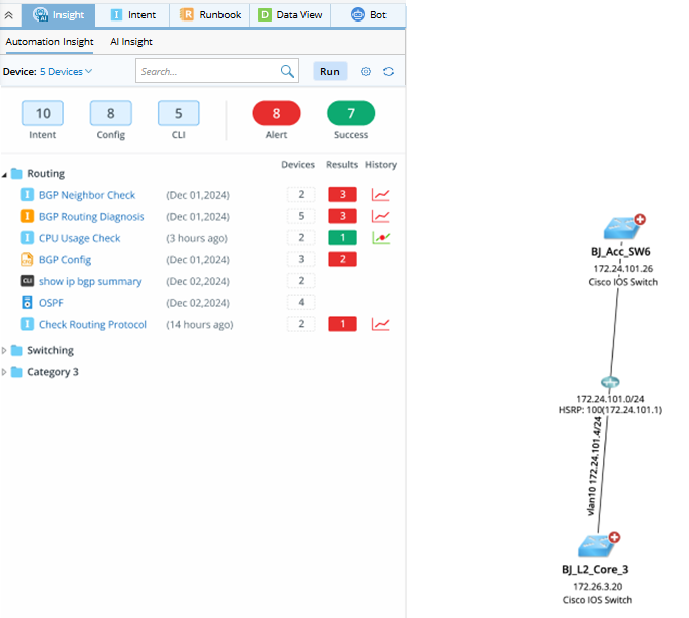
- With NetworkBrain Insight, users can query the NetworkBrain automation results using natural language, and use AI to summarize the results and detect alerts without scanning through hundreds of automation results. Additionally, NetworkBrain Insight allows users to customize the knowledge the LLM relies on, allowing them to control how the input is summarized, and customize how AI Insight handles certain types of questions.

User Flow
There are two main user flows:
- End users use NetworkBrain Insight. View the last automation results or results summarized by LLM in NetworkBrain Insight.
- Power users can manage resources in Insight Manager. They can enable/disable the automations or add/delete other resources