R12.1 Project Publication-2025Dec23
This Feature
In this node, you will specify the Name, Description and the Target Devices for the newly created Golden Feature (GF). Also, you can view the Associated Golden Intents and Operation History.
Example: To create a feature for HSRP devices.
-
In the This Feature node, provide the following basic information:
- Name: Enter the name, HSRP. Feature names must be unique within the same folder.
- Description: Enter a brief description of the feature.
- Target Device: From the drop-down menu, select a predefined Device Group for a specific set of devices or select All Network for broader applicability. The Target Device approach depends on the network feature you intend to decode:
- For network features configured on all devices (e.g., SNMP, Password, Telnet/SSH), select All Network as the target.
- For network features configured on a specific subset of devices, use the Dynamic Search.
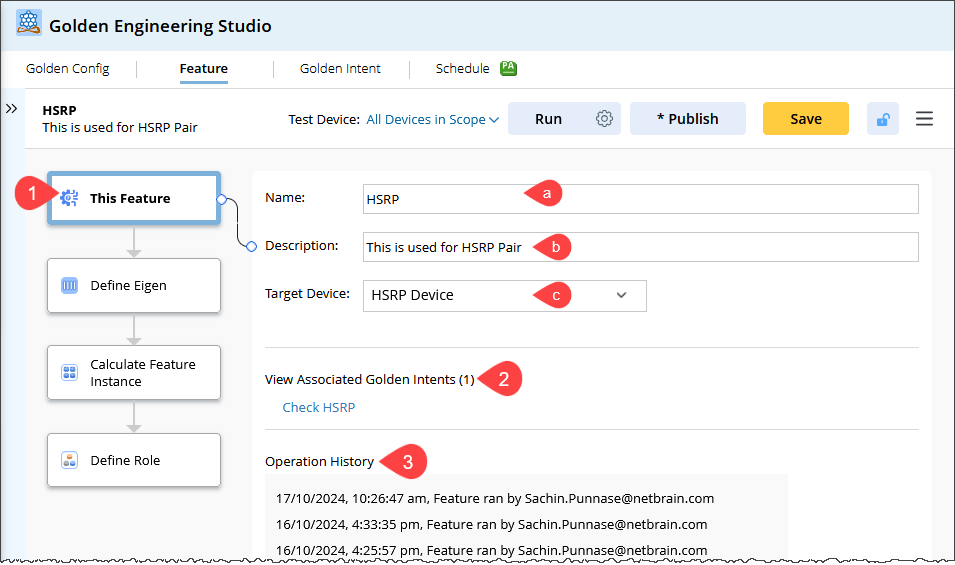
- View Associated Golden Intent: This section displays all the Golden Intents that use the current GF. Click the link to open the Golden Intent Manager and see the details of the GI.
-
View Operational History: Displays a chronological log of operations performed on a GF. The displayed information will be as follows:
- Name of the user who created the GF and the creation timestamp.
- Run and Role Calculation Operations: Name of the user who performed each operation and the corresponding execution timestamps.
- Name of the user who executed the publish action and when it occurred.
- Name of the user who performed the load setting action and the execution timestamp.

|
Note: During Export/Import or Save As operations, the operation logs from the original Feature will not be transferred to the new feature. |