R12.3-2026Apr21
Build Dashboard
Once the ADT is saved, you can further build a dashboard for it. The Build Dashboard link is available only after the ADT is saved and publicly visible in the ADT manager. The created intent dashboard will be added to the new/existing/map observability dashboard.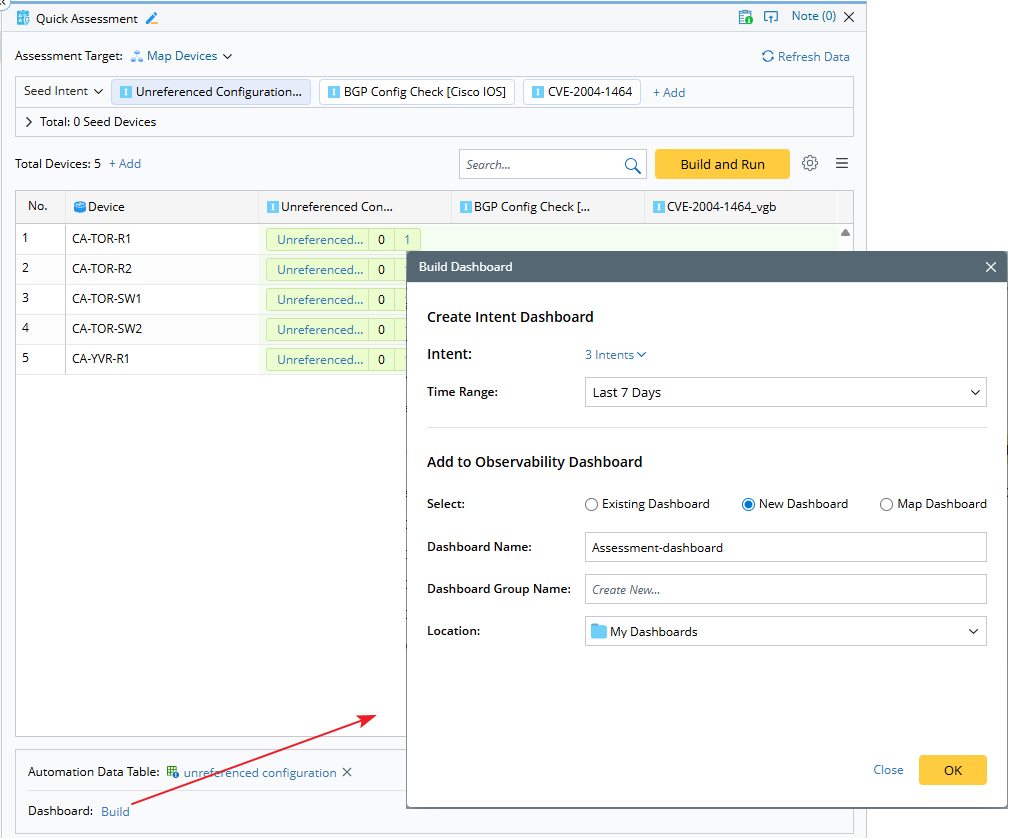
- Click Build in the Dashboard area at the bottom.
- In the Build Dashboard dialog, you can select ADT intents, with all visible intent columns selected by default.
- Once the dashboard is created, a link to the observability dashboard is displayed.
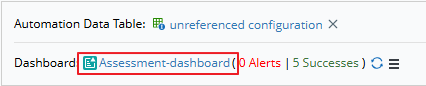
- For the ADT above, you can add or remove devices and then Build and Run. The corresponding intent dashboards are updated automatically based on the latest cloned intent outputs.
- For the ADT intent columns that are manually added or removed, you need to update the intent dashboards manually by selecting or removing the ADT intent columns.