Control Logic Blocks
You can use the following different logic blocks to control which actions are executed to diagnose the intented issue.
If-Message-Else Message
If-Message-Else-Message logic is used to perform different actions based on whether a condition is true or false. If the condition is not met, the "else" statement executes alternative actions.
Example: You can use If-Message-Else-Message logic to check the OSPF neighbor state.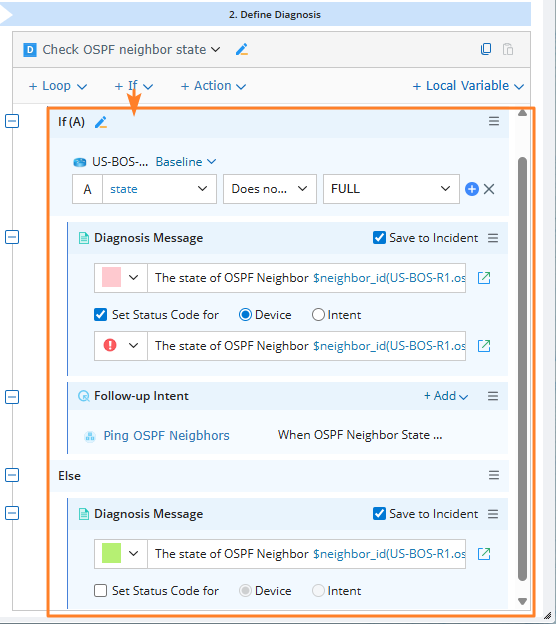
- In an intent, click If directly to add this logic block.
- Set the condition as If state Dose not contain FULL.
- Define the Diagnosis Message content.
- Execute this intent. If the specified condition is true, the content of the defined "if" message will be output. Otherwise, output the "else" message.
Loop
Loop logic allows you to repeatedly execute the included logic blocks or actions until a specific condition is met.
Example: Loop an ADT that defines an ACL compliance rule to check whether the current device's ACL configuration matches the rule.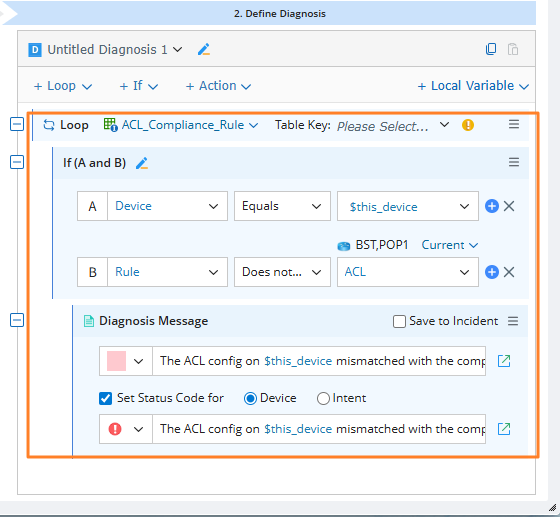
- Define ACL compliance rules in the ADT 'ACL_Compliance_Rule'.
- Use loop logic to iterate through multiple devices.
- Automatically check whether each device's ACL complies with the defined rules.
Switch-Case-Message
NI also supports the switch-case-message logic, which can serve as a simplified version of ‘if-then-else’, and offer a more concise expression, better performance, and a reduced likelihood of errors.
When you need to execute different code blocks based on multiple possible values of a single variable, switch-case-message logic can make the code simpler and more readable.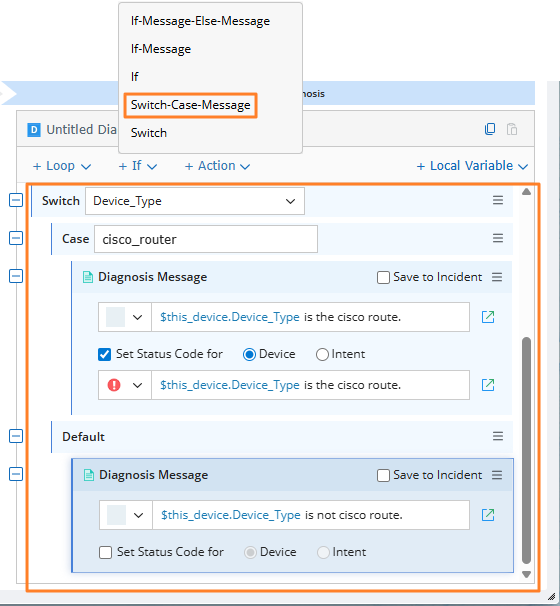
For the ‘switch-case-message’ statement:
- The variable type of the ‘switch-case-message’ can only be int, float, or string.
- It can contain multiple case branches, 0 or 1 default branch. If there is a default branch, it can only be placed at the end.
- ‘Case’ can only be followed by a constant, and its type must be consistent with the switch variable type. It cannot be a variable or an expression.
- All cases will be analyzed in turn to find the matching ones. If a case branch matches, the diagnosis logic in this branch will be executed. If no case branches match, the diagnosis logic in the default branch will be executed.
More Built-in Logic Blocks
To make it easier to add commonly used diagnosis templates, you can add more built-in compound diagnosis blocks for Loop and If logics, simplifying the definition of common logic flows.
For Example: You can add the Loop-If-Message with a single click.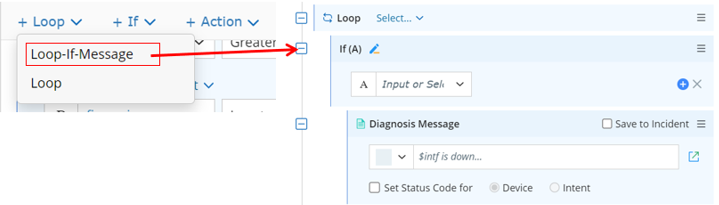
See also: