Deploy and Install System
Our system is an adaptive automation platform, where you can integrate with your existing Network Management System (NMS) tools and IT workflows to automate documentation, troubleshooting, network change, and defense. It serves as an operating system of your whole network to relieve network professionals from manual CLI-digging and also empowers team collaboration to elevate productivity.
The browser-based interface of our system is backed by a full-stack architecture, adopting advanced distributed technologies to support large-scale networks with more expansion possibilities.
The distributed system architecture is as follows:
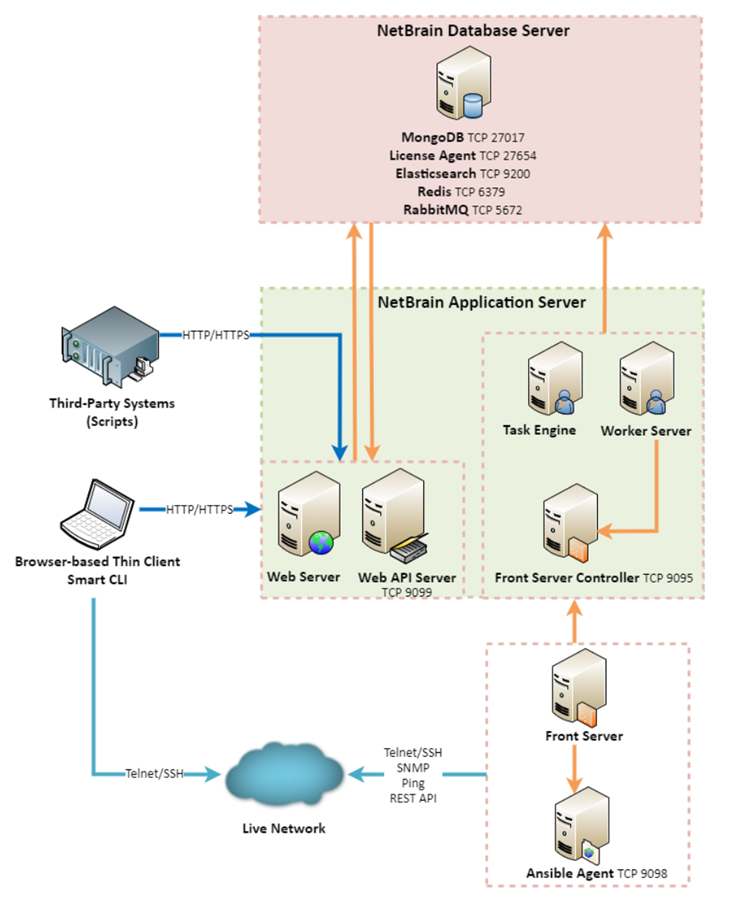
The system components include:
| Component | Description |
| Browser-based Thin Client | It provides a user interface for end users to access the system. |
| MongoDB | It serves as a system data repository. |
| License Agent | It provides services that validate and activate licenses. |
| Elasticsearch | It serves as a full-text search and analytics engine in a distributed multi-user environment. |
| Redis | It provides memory cache for the system. |
| RabbitMQ | It prioritizes and forwards requested tasks. |
| Web Server | It serves static content such as HTML, JavaScript, and CSS resources, which serves as the user interface of the Thin Client. |
| Web API Server | It provides the front-end web applications to support the browser-based Thin Clients and serves RESTful API calls from third-party applications for integration. |
| Worker Server | It serves as a resource manager to support computing tasks. It relies on both Redis and RabbitMQ to work. |
| Task Engine | It coordinates computing tasks. |
| Front Server Controller | It serves to coordinate and communicate with Front Servers and other components. |
| Front Server | It serves as a polling server to collect and parse live network data. It is the only component required to access the live network. |
| Service Monitor Agent | It monitors the health of your NetBrain Servers with operations management of related services. |
| Ansible Agent (add-on) | It integrates with Ansible to define, execute playbooks and visualize results in Change Management Runbooks. See Ansible Integration for more details. |
| Smart CLI (add-on) | It provides a Telnet/SSH client to connect to devices from Windows and can be integrated with the system workflows. See Smart CLI for more details. |

|
Note: The port numbers listed in the above architecture diagram are defaults only. The actual port numbers used during installation might be different. |
System Requirements
For hardware, network connectivity, and operating system, and other deployment requirements, please refer to System Specification.
Deployment Methods
- Combined All-in-One Deployment. All-in-One is the simplified deployment. Refer to All-in-One Setup Guide.
- Standard Two-Server Deployment. The two-server deployment requires one Windows server for applications and one Linux server for the database. Refer to System Setup Guide for Two-Server Deployment.
- Distributed Deployment. The distributed deployment method is flexible for mid-range and large networks, requiring more machines to provide more scalability and resiliency. Refer to System Setup Guide for Distributed Deployment.
- High Availability. HA deployment is applicable to an environment within one data center or across multiple data centers, aiming to prevent the single point of failure (SPOF) on applications, virtual or physical machines. Please contact the support team for the High Availability Setup Guide.