R12.3-2026Apr21
Instruction
Enter the instruction and click Send to ask AI to analyze the input data.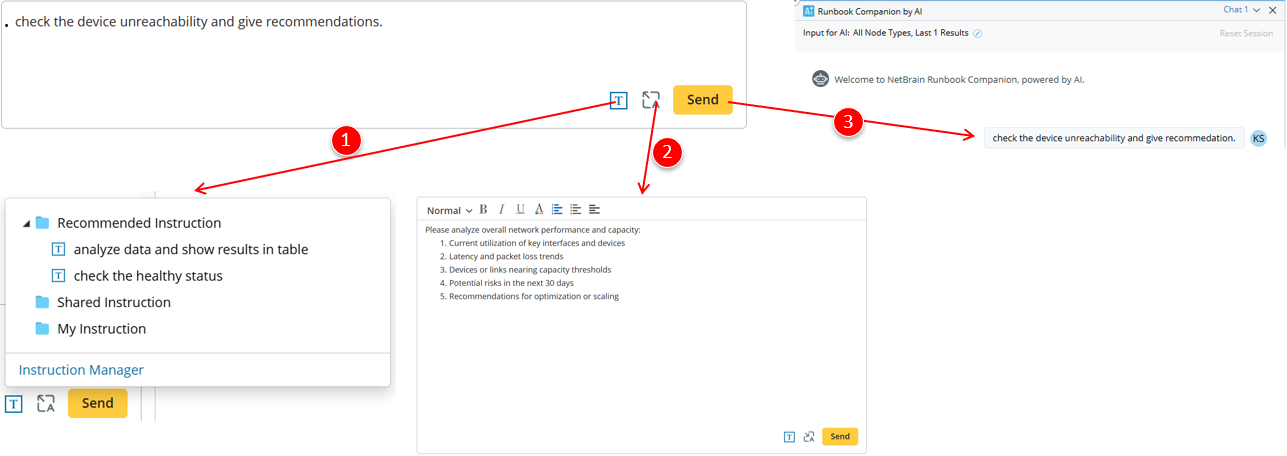
- Saved Instructions: click and open the menu to select a saved instruction for more convenient use.
- Rich Text Format: allows complex formatting for better readability.
- After sending, the instruction appears in the chat area. Hovering over it will display the following actions.

- Edit: Enter the instruction into the input box and modify it.
- Copy: Copy the instruction to the clipboard.
- Save Input: Save the prompt to the instruction manager.
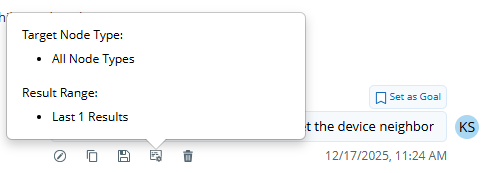
- Input Settings: Click to show the input used when sending this prompt.
- Delete: Remove the input along with its corresponding response.
Sample AI Prompts: The Runbook AI Companion can assist network engineers in the following scenarios. Their sample AI prompts are listed below:
| Scenario | Sample AI Prompt |
| Network Troubleshooting | I have voice issues from 10.8.1.4 to 10.8.3.134. Help me troubleshoot the most likely root cause |
| Network Assessment | Please check CVE vulnerabilities on the site New York |
| Network Change | Please analyze the impact of the changes defined in this runbook on the relevant devices and application paths |
| Runbook Data Analysis |
|