R12.3-2026Apr21
Set Up MPLS Cloud

|
Note: To display the provider’s MPLS network in the system, you must set up the MPLS cloud by following the MPLS configuration instructions. If MPLS visibility is not required, you can skip this topic. |
NetBrain GCP support requires excluding all the Google Cloud Router devices connected with MPLS Cloud because the Cloud Router in GCP is in the control plane and should not involve the data plane.
When configuring GCP support in NetBrain, make sure to exclude all Google Cloud Router devices connected to the MPLS cloud. Cloud Routers operate in the control plane and should not be included in data plane analysis.
Follow these steps to exclude all the Google Cloud Router devices:
- Log in to your system.
- Go to the Cloud Manager page from the Fine Tune tab of the Domain Management page. Add your new MPLS or edit the existing one, and select Exclude Device.
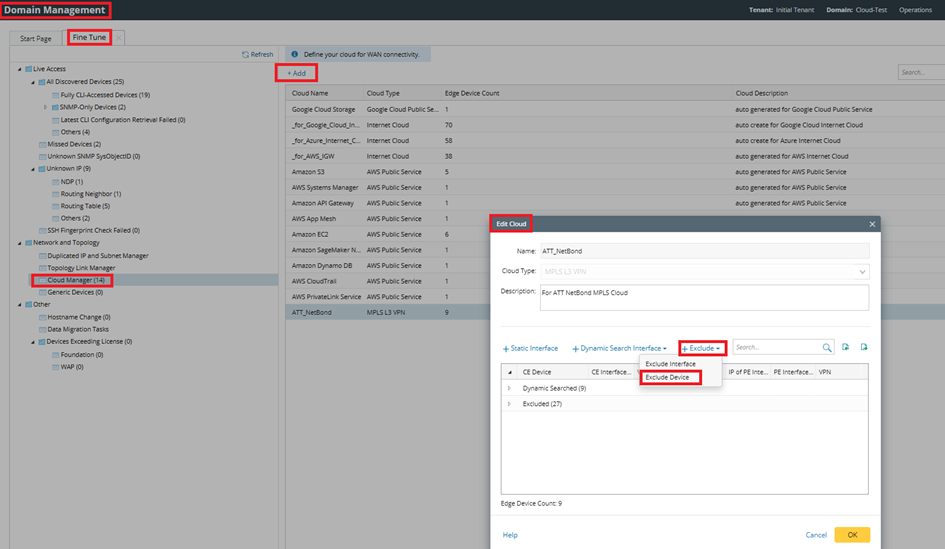
- Select the Google Cloud Router from the drop-down menu, and click the
 icon to move all selected devices from left to right. Click OK to finish.
Failure to exclude all the Google Cloud Router devices connected to MPLS may cause the path calculation issue. If you have any issue creating MPLS Cloud in the NetBrain IE system, contact NetBrain Support.