R12.3-2026Apr21
Setup Kubernetes API Access
This topic guides you through enabling API access in your Kubernetes cluster by creating a service account with the necessary permissions. You’ll use a YAML configuration to set up a namespace, a service account, a cluster role, a role binding, and a secret to hold the authentication token. After applying the configuration, you’ll verify the setup and retrieve the token for use in your system, making it easy to connect securely to the Kubernetes API.
Setup Service Account
To enable API access, create a service account with the required permissions using the following YAML configuration.
This configuration creates these resources in the Kubernetes cluster:
YAML |
apiVersionv1 kindNamespace metadata namenb-access --- apiVersionv1 kindServiceAccount metadata nameapi-service-account namespacenb-access --- apiVersionrbac.authorization.k8s.io/v1 kindClusterRole metadata nameapi-cluster-role namespacenb-access rules apiGroups "" apps autoscaling batch extensions policy rbac.authorization.k8s.io networking.k8s.io crd.projectcalico.org resources pods componentstatuses configmaps daemonsets deployments events endpoints horizontalpodautoscalers ingresses jobs limitranges namespaces nodes pods persistentvolumes persistentvolumeclaims resourcequotas replicasets replicationcontrollers serviceaccounts services fieldSelector config-view blockaffinities verbs"get" "list" "watch" --- apiVersionrbac.authorization.k8s.io/v1 kindClusterRoleBinding metadata nameapi-cluster-role-binding_new subjects namespacenb-access kindServiceAccount nameapi-service-account roleRef apiGrouprbac.authorization.k8s.io kindClusterRole nameapi-cluster-role --- apiVersionv1 kindSecret typekubernetes.io/service-account-token metadata namemysecretname namespacenb-access annotations kubernetes.io/service-account.nameapi-service-account |
Apply Configuration
Follow these steps to apply the configuration using the YAML file:
- Save the provided YAML content as svc.yaml.
- Apply the configuration with this command:Code
kubectl apply -f svc.yaml

- Verify the configuration using these commands: Code
kubectl get serviceaccount -n nb-access
kubectl get secret -n nb-access
Retrieve Secret Token
Follow these steps to retrieve the API token:
-
Get the secret name:
Codekubectl get secrets -n nb-access
-
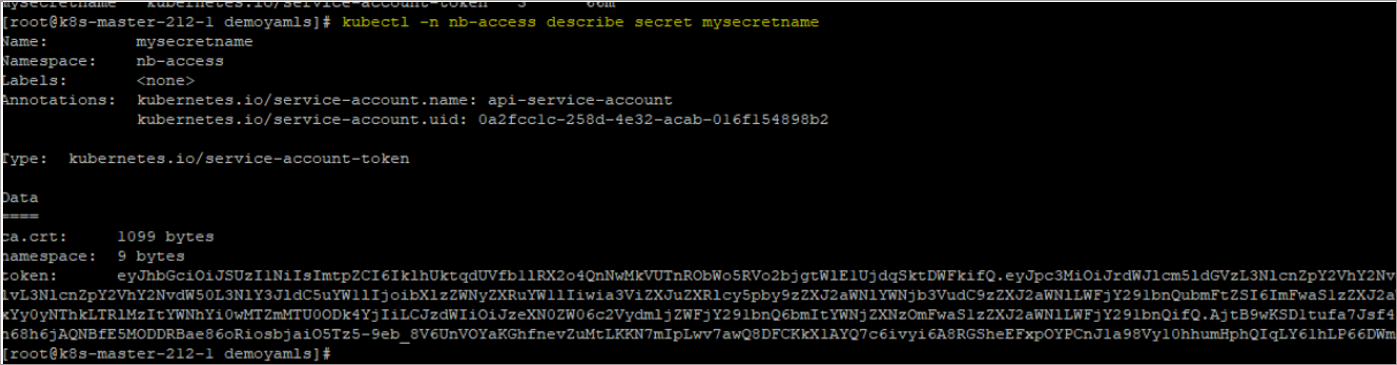
Describe the secret to extract the token:
Codekubectl -n nb-access describe secret api-secret-token
-
Copy the token securely. You’ll use this token in the NetBrain system setup.