R12.3-2026Apr21
Visualize the LogicMonitor Monitor Metrics History Result with DVT
Use Case
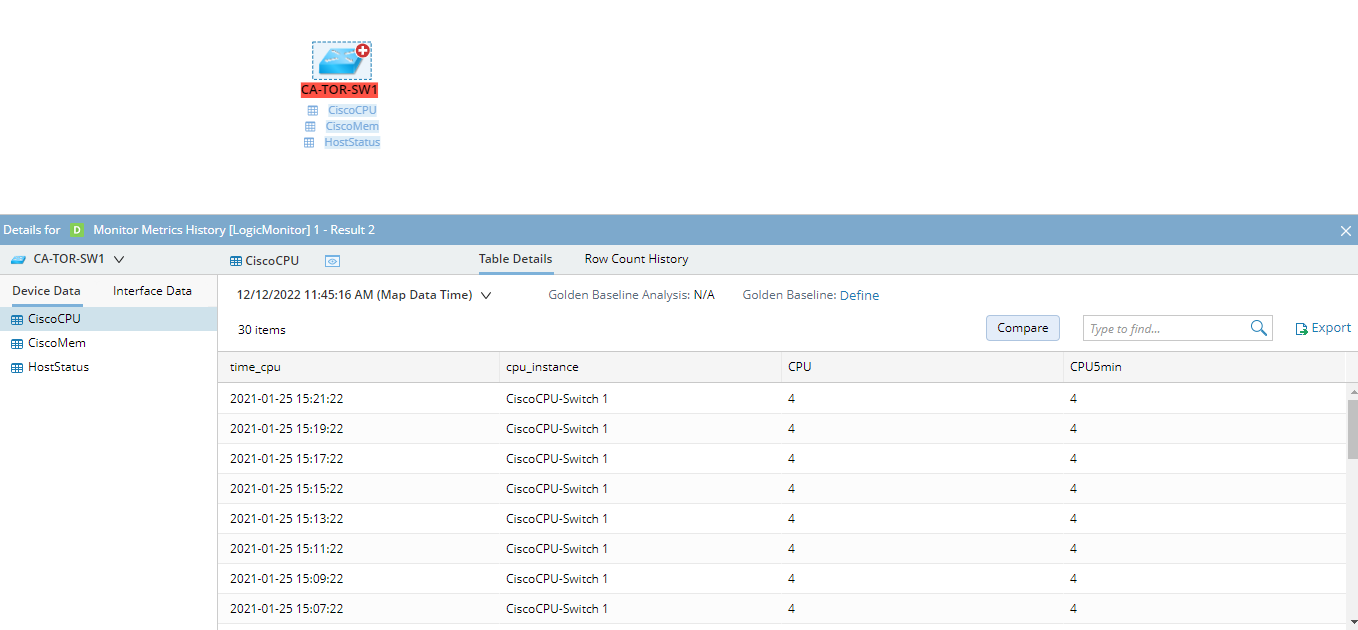
Using the publicly available LogicMonitor REST API, we have created an integration compatible with our system that enables an end user to easily access the LogicMonitor monitoring metrics history of the past 1 hour from a topology-based spatial troubleshooting context - a user-created map.
With this integration, our system can overlay the following extended information in a table.
- Cisco Switch
- CPU
- Memory
- Host Status
- Cisco Router
- CPU
- Memory
- Host Status
- Check Point FW
- CPU
- Checkpoint System Global Statistics
- Host Status
- Extreme Switch
- Extreme Chassis Status
- Extreme Network Memory Usage
- Host Status
- F5
- CPU
- Memory
- System
- Host Status
- Interfaces
- Riverbed
- CPU
- Riverbed Global Status
- Host Status

|
Note: This solution makes queries to LogicMonitor based on the device hostname as the primary key. Our system's device hostname and LogicMonitor hostname must be identical to make this solution functioning. |
Map with LogicMonitor Monitor Metrics History Overlay
Below are example representations of the LogicMonitor monitor metrics history data overlay on the map.