R12 Publication-2025July16
Build Dashboard
Golden Intent pane allows you to generate an intent dashboard, which can be added to a new observability dashboard or an existing one, to display the current intent results. 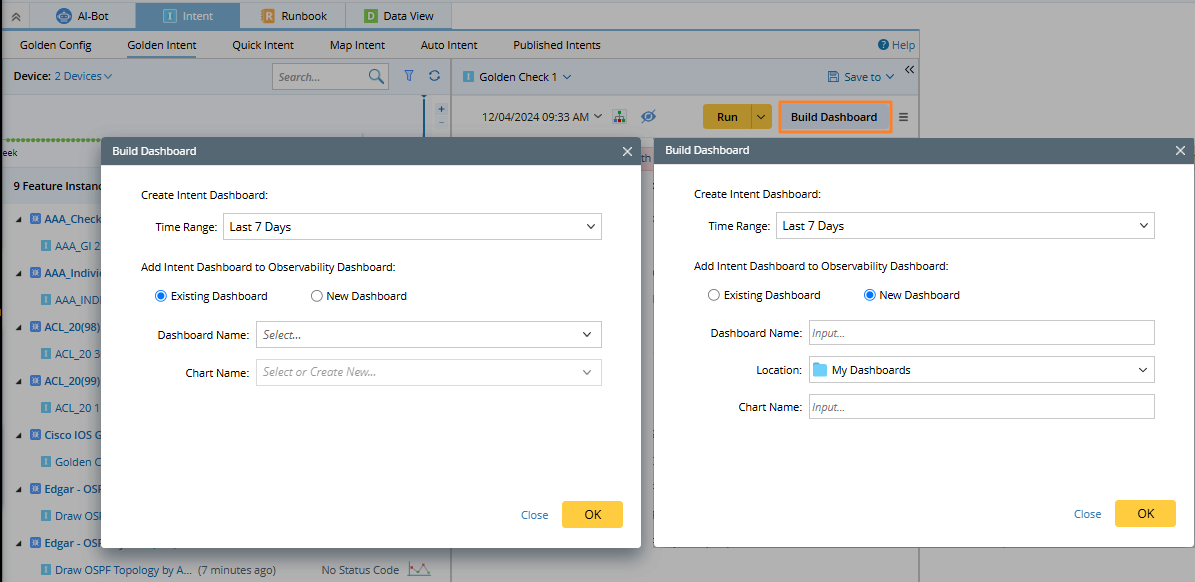

|
Note: You must save the current map before building a dashboard. |
You need to define the following information while building a dashboard:
- Time Range: Select the time range to narrow the range of results users want to show.
- Existing Dashboard: If this radio is selected, the generated intent dashboard will be placed in a observability dashboard.
- For the Dashboard name, the dashboard scope users can select is: the dashboard list of the current map, the dashboard list of the current incident in the current map, and the dashboard list under the existing folder structure.
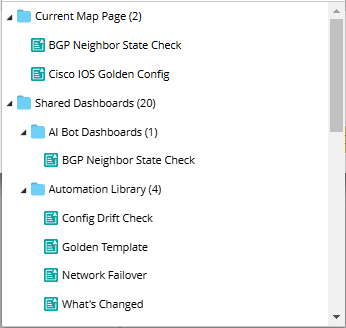
- Chart Name: Select a chart name (dashboard group) depending on the selected dashboard.
- For the Dashboard name, the dashboard scope users can select is: the dashboard list of the current map, the dashboard list of the current incident in the current map, and the dashboard list under the existing folder structure.
- New Dashboard: Users can also create a new dashboard, and they need to enter a dashboard name, select a location, and enter a new chart name. The new dashboard will be saved in the observability dashboard manager.
The existing used or newly created dashboard will be associated with the current map. They can be opened (clicking the name) and unlinked the relationship in the drop-down list. 