Golden Config Pane on Map
The concept Golden Config is introduced to the Golden Engineering Studio (GES) to perform Golden Config Check, detect network changes. To make it possible to browse the Golden Config Check results from a map, Golden Config pane is added as a sub-pane of the Intent Pane on a Map, where users can view the summary information and details of Golden Config Check results for matched map devices, perform related operations.
Golden Config Pane UI
By default, the first matched map device data will be displayed in the Golden Config pane. A sample Golden Config Pane UI is illustrated below: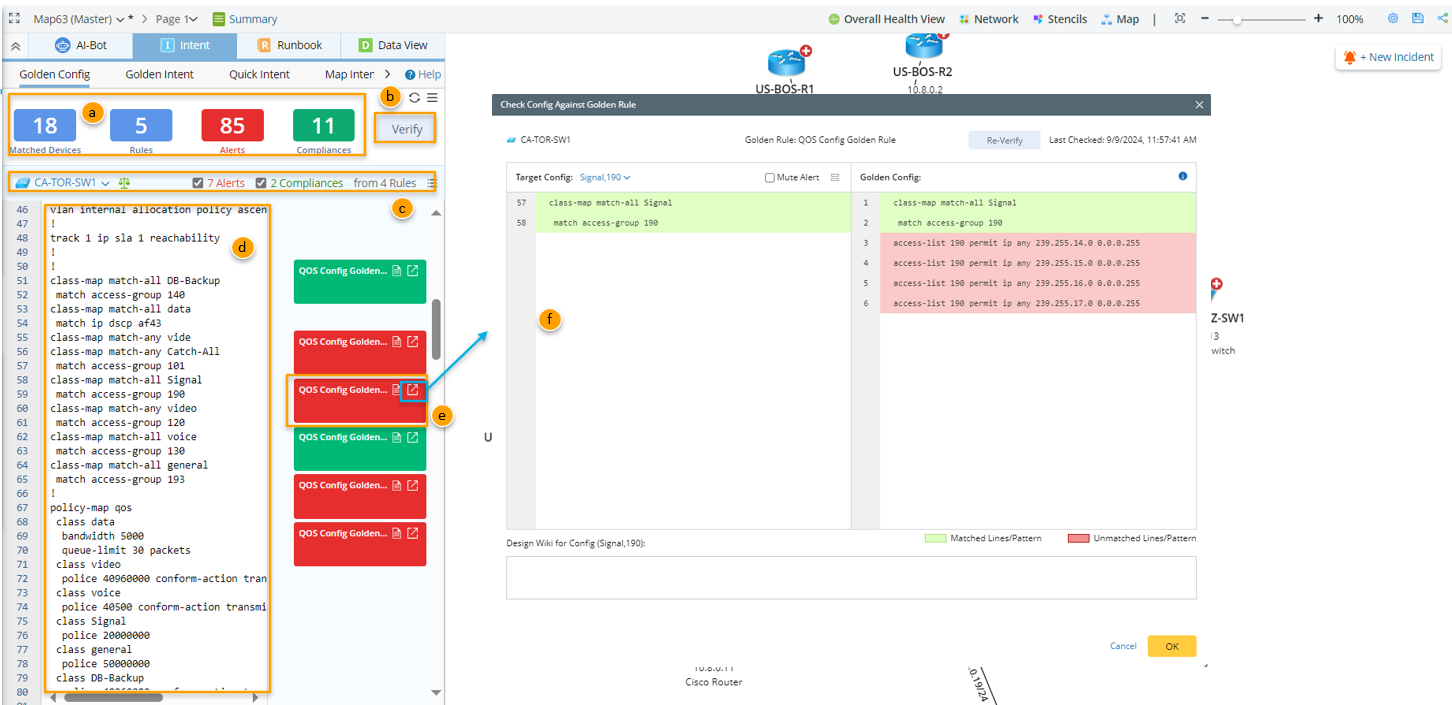
a. Summary Information area: Shows the count of matched devices, count of Golden Config Rules matched with all these matched devices, and the count of alerts/compliances from Golden Config Check results.
b. Verify: Manually verify all the golden config rules in batch to get the latest results.
c. Summary Information for a specified device: Shows the statistical data for a specified device, including the number of Golden Config Rules applied to this device, and the count of alerts and the count of compliances from all these Golden Config Rules.
d. Config lines: The full config lines from the selected device are displayed by default.
e. Instances of the Applied Golden Config Rules: The Golden Config Rules matching with the device are identified by unit of instance. The Golden Config Rules are shown as ‘Golden Config Rule Check Note’ on the right side and are color-coded to indicate the golden config check results (Alert/Compliance).
f. Check Config Against Golden Rule window: This is a window for displaying the details of Golden Config Check results for each config instance and verifying the current golden rule.