R12 Publication-2025July16
Golden Intent Pane on Map
After the Golden Intent member intents are published, users can view the diagnosis results on the Golden Intent pane. On this pane, the member intents generated in GES can be filtered by map devices, automation tags, and features/golden intents. End users can then directly use these intents to display the golden automation of map devices, view Golden Intent results, and build a observability dashboard for the map.
The main UI and functions are as follows:
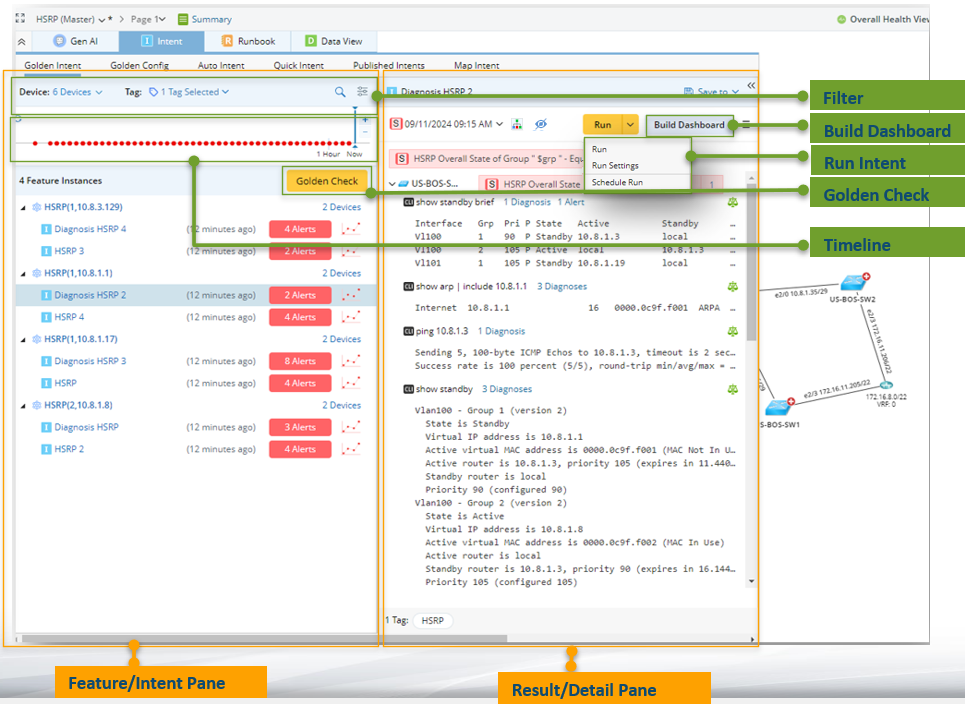
- Filter: Filter the feature instances and member intents.
- Timeline: View history results of intent execution by timeline.
- View Feature/Intent: Click the feature instance to display the related information on the right pane. Click the intent to run and view the execution results on the right pane.
- Golden Check: Encapsulate the intent to run and view the diagnosis tree.
- Run Intent: Run and schedule the intent.
- Build Dashboard: Generate a observability dashboard to display the intent results.