R12 Publication-2025July16
Set up the API Server
Create a PRTG API Server:
Pre-requisites
Application Version
| Application | Version |
|---|---|
| PRTG | PRTG 17.4(or newer) |
Network Connectivity
| Source | Destination | Protocol |
|---|---|---|
| NetBrain Front Server | PRTG Server | HTTP/HTTPS |
User Account and Privileges
| Application | User Account | Required Role Assignment(s) |
|---|---|---|
| NetBrain | Required | System Admin |
| PRTG | Required | API Read-only User (or higher) |
Create PRTG API Server Connection

|
Note: If the environment has been deployed with multiple Front Servers, repeat this section for each of the Front Servers. |
- Using a web browser, login to the NetBrain Desktop UI using the System Admin credentials
- http://<NetBrain Web Server IP>
- Navigate to the NetBrain API Server Manager
-
Domain Management > The Start Menu
 > API Server Manager
- In the API Server Manager screen, click Add.
- Complete the Add API Server dialog screen as follows:
- Server Name:PRTG API Server <Front Server>
- Description: PRTG
- API Source Type: “PRTG API Adaptor”
- Endpoints:PRTG instance endpoint (For example: “http://192.168.28.23”)
- Username: PRTG login account’s username
- Password: PRTG login account’s password
- Front Server/Front Server Group: Select FS/FSG which would have reachability to the PRTG server
-
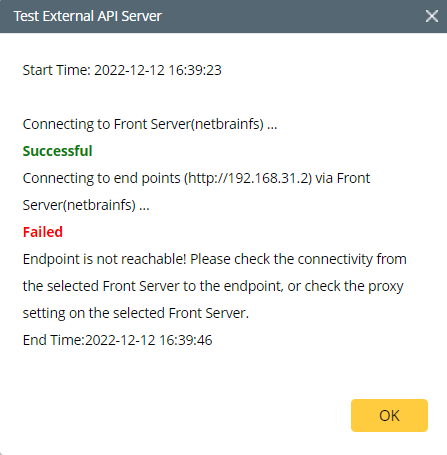
Click Test to initiate a connectivity test between the NetBrain front server and the PRTG instance configured. Pictured below is the result of a successful connectivity test followed by two typical failure scenarios: Incorrect credentials and connectivity between NetBrain and PRTG.
Test Results Screenshots Successful Connection 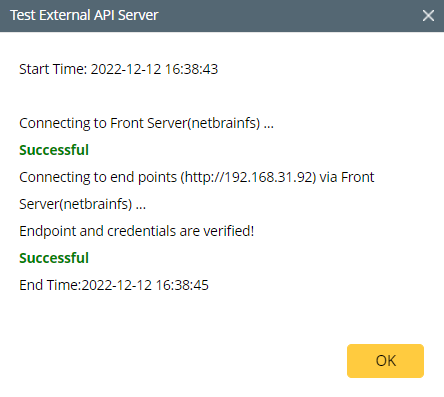
Error Scenario: Endpoint is reachable with error encountered.
Unauthorized Possible Resolution: Confirm credentials specified in the PRTG API Server configuration and try it again.
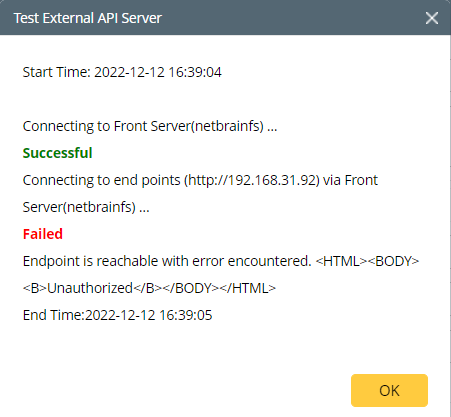
Error Scenario: Endpoint is not reachable! Please check the connectivity from the selected Front Server to the endpoint, or check the proxy setting on the selected Front Server.
Possible Resolution: Confirm that the NetBrain Front Server(s) can reach the PRTG platform using 3rd party tools (Ping, Traceroute, Wireshark)
-
Click Managed Devices to add devices to this API Server.
Note: Devices must be assigned to each corresponding API Server. - Once the successful connection with the local PRTG instance has been confirmed, click OK to finalize the PRTG server connection.
- Repeat steps 2-7 for each additional deployed Front Server.