10.1.9 JA Publication
Preview Intent Template and ADT Intent
You can view the details about the intent template or the ADT intent, then decide whether you want to use the intent for creating new intent. The details of the intent can be shown in the Intent Preview area. Also, you can view the seed intent for an intent template.
- Preview Intent Template:
Click an intent template in the left pane, or the Selected Device/Intent Entries area to preview it. The details of the intent template will be shown in the Intent Preview & Input for Macro Variables area. The Input Value area will be shown if the previewed intent has macro variables.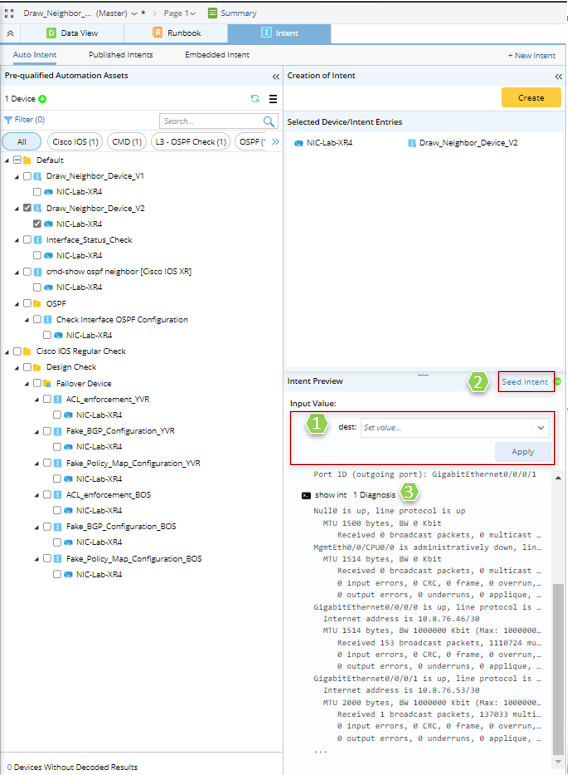
- Preview macro variables (if macro variables are defined for this intent template): View the current macro variables defined for the intent template, which can help to decide if the macro variables need to be modified (see Customize Macro Variables for Intent Template in Auto Intent for more information).
- View seed intent. Click Seed Intent to see the details of the seed intent. The original devices and matched command diagnoses in the seed intent are shown.

- View decoded data of the intent template, including command section, diagnosis, etc.

Tip: Hover your mouse over the Configuration or Diagnosis, tip message will appear to show more information.
- Preview ADT Intent
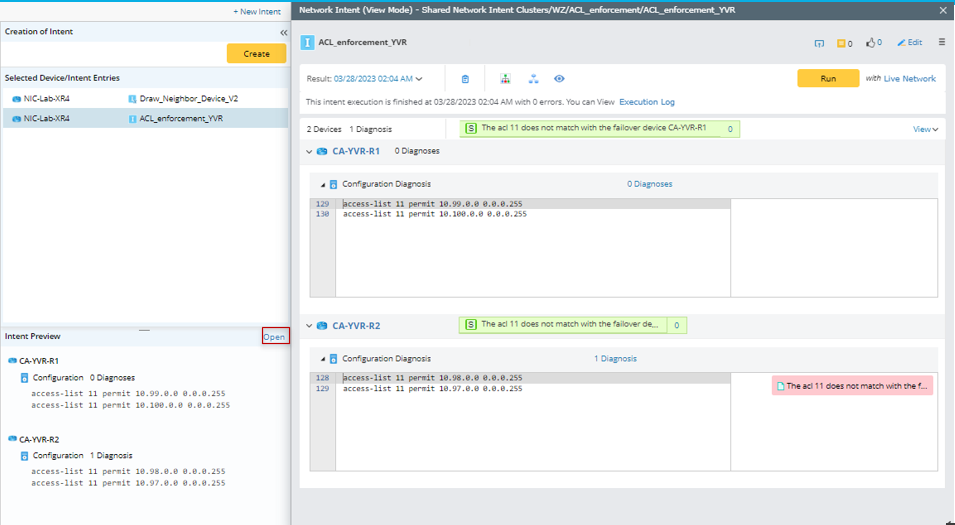
Click an ADT intent in the left pane, or the Selected Device/Intent Entries area to preview it. Then the details of the ADT intent will be shown Intent Preview area. It is noted that when your select to view an ADT intent, the Input Value area will not be displayed, because ADT intent does not have configurable macro variables.
- View ADT intent basic information: View the ADT intent basic information in the Intent Preview area, including command section, Diagnosis, etc.
Tip: Hover your mouse over the Configuration or Diagnosis, tip message will appear to show more information. 
- View the ADT intent in View-Mode: Click Open to view all the information about the ADT intent.