2023-Nov-03-R11.1a
Retrieve Live Data
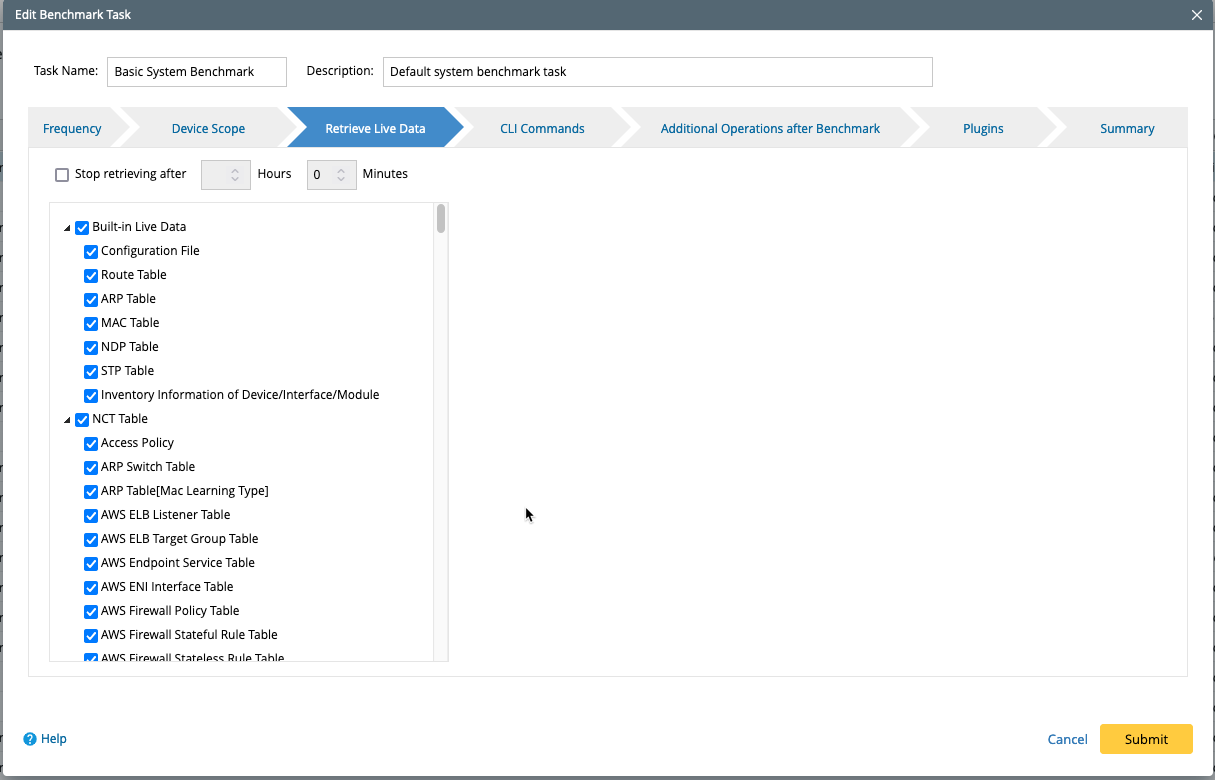
Select the data to be retrieved during the Benchmark task and set a time limit threshold. There are three types of data to be retrieved:
Recommended Settings
- In the Retrieve Live Data tab, select all Built-in Live Data.
- For NCT Tables, select all NCT Tables that apply to your network to get accurate results with Cache Data or Historical Data; For Other NCT Tables, select the tables that apply to your network. For example, select all types of BGP-related Tables if your network has BGP enabled.
- For Basic Data for SDN Devices, select the basic data for all SDN vendors you have in your network.
- (Optional) Check the Stop retrieving after some Hours some Minutes option and enter the time limit for data retrieval.
Built-in Live Data
- Built-in Live Data is essential data universal for any network, such as Configuration File, Route Table, ARP Table, MAC Table, NDP Table, etc.
- They help build your topology and will be displayed in the Data Table tab in the device details pane for physical devices.
NCT Table
-
IPsec VPN Table & NAT Table — only used for the CheckPoint Firewall.

Note: Before retrieving them, click on  > CheckPoint OPSEC Manager for configurations.
- IPsec VPN Table[Real-time] & NAT Table[Real-time] — used for device types except for the CheckPoint Firewall.
|
|
Note: Path NCT Tables are a collection of all advanced path-related tables, such as Real-Time NAT Table, MPLS VPNv4 Label, IPSec VPN Table, etc. They are used to calculate the Current Baseline Path or Historical Data Path.
|
|
|
NOTE: Unlike Built-in Live Data, which is basic data for almost every network, those data tables are exclusive to certain vendors or certain types of networks, such as BGP Neighbors Table, AWS End Point Service Table, OSPF Neighbors Table and Multicast Route Table, etc. They can be viewed by the right-click menu View Device Data of the device on the map. |
Basic Data for SDN Devices
- Those are the basic data for SDN devices, such as Cisco ACI, VMware vCenter, VMware NSX-V, Cisco Meraki, Checkpoint R80, etc.
Stop Retrieving after Some Hours
- Sometimes it could take a long time to retrieve data due to large data tables or CLI timeout. Enter the hours and minutes to help keep the data retrieval time within a reasonable time range. The system will stop retrieving the data after this time elapses.