R12.1 Project Publication-2025Dec23
AIP Rate Limit

|
Note: This feature is supported in the patch12.1.0.7. Ensure your system is upgraded to one of these patches to use this feature. |
API rate limiting is a critical practice that controls the number of API requests a client or user can make within a defined time period—ensuring system stability, security, and cost control. With API Rate Limit functionality, the following goals are achieved:

- Enables stable and reliable services
- Shields against malicious and accidental abuse
- Promotes fair usage across users
- Helps contain operational costs
- Strengthens API endpoint security
Define API Rate Limit Policy
To define AIP Rate Limit policies, follow the main steps below:
- Go to System Management page > Open API > API Rate Limit tab.
- Click +Add to open the Add Policy dialog.

- Enable Rate Limit Policy: A new rate limit policy is enabled by default.
- Provide basic information such as policy name and description.
- API Path Prefix: in the input field, type the API URL prefix of API Pattern. The matched APIs by the URL prefix will follow the rules in this policy. Configure the prefix for multiple URLs that will be used to match the APIs, e.g. "API/" (which means all APIs are matched), "API/V{version:apiVersion}/TAF" (which means APIs of TAF are matched).
- Rate Limit Strategy for Matched APIs: Select from one of the following two options to decide how to count the API access rate for the matching API pattern.
- Limit All AIPs Combined (default option): The API requests are counted for all matched APIs to monitor whether API Rate Limit policy is violated.
- Per-API Rate Limit: The AIP requests for each individual API is counted.
- Rate Limit Key: Select one option from the dropdown list to define the scope of API calls that are counted.
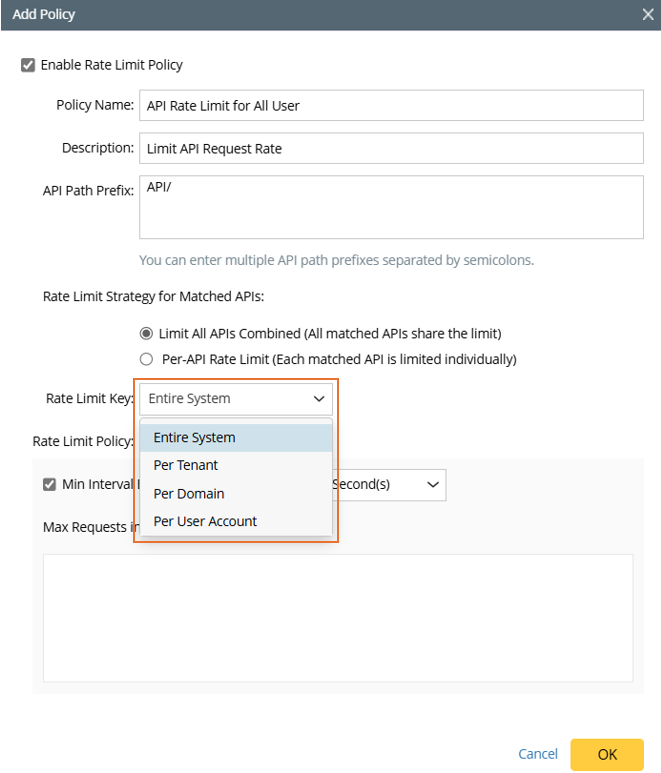
- Rate Limit Policy: in this section, the minimum interval between two requests and the maximum number of requests within a time period are configured.

- Min Interval Between Requests: input a value and select the measuring unit. The intervals are measured by unit of Second/Minute. The default value is 100 seconds.
- Max Requests in a sliding window: several policies can be defined in this section, which will work concurrently to control API Request Rate.
- Click +Add to add a policy to the table in this section.
- Set the maximum number of request and define the time period. A policy can be deleted by clicking the
 icon.
icon.
- Click OK to save the created policy.
Manage and View API Rate limit Policy
The API Rate Limit policies are managed in the API Rate Limit tab.

Each entry in the table shows information about created API Rate Limit policy.
- Enable: Check the checkbox to enable the policy.
- Policy Name: The name given when the policy is defined.
- AIP Path Prefix: The URL prefix of URL pattern.
- Rate Limit Strategy: The Rate Limit Strategy selected for this API rate limit policy.
- Rate Limit Key: The rate limit key defined for this API rate limit policy.
- Min Interval Between Requests: The value of min internal between request defined for this API rate limit policy.
- Max Requests in a Sliding Window: The number of rules of the maximum requests in a sliding window is displayed in link form. Click the link, you can view all the rules of the maximum requests in a sliding window.
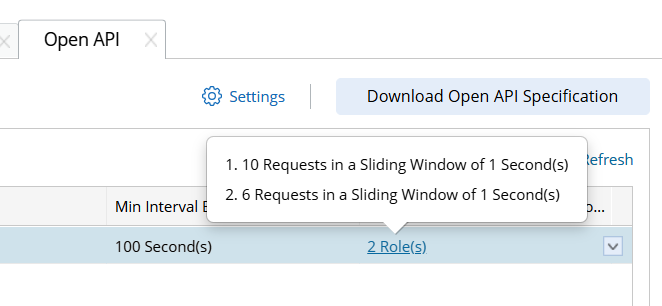
The API Rate Limit Policy can be edited for deleted.