Assign Template Variable Value Using NI Variable
The template variables read by the system are displayed in the UI and assigned values according to the following rules.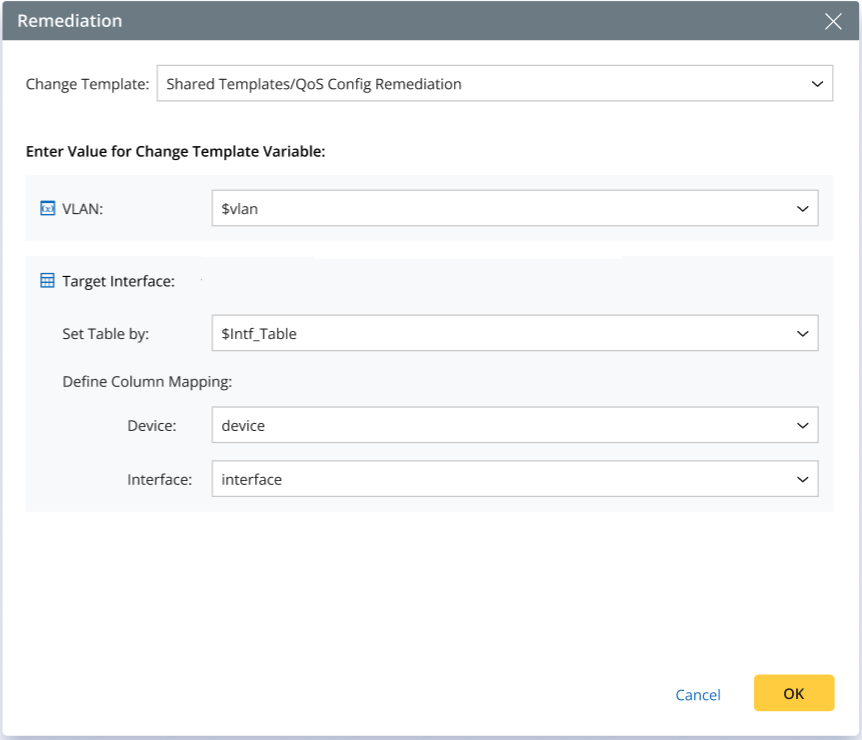
| Template Variable Type | NI Variable Available |
| Single Type (String/Int/Float/Bool) | Assign values directly using the same type of NI variable, or use the corresponding type of list variable. |
| Device | Assign values directly using NI variables of Device type or List of Device, or use NI variables of String type/List of String (to support hostname strings). |
| Interface | Assign values directly using NI variables of the Interface type or the List of Interface. |
| Table - ADT Based | Not Supported Use an empty table when instantiating a CM task. |
| Table - Manual Input | Assign values using NI table variables, and specify the column mapping relationship.. Note: “Target Interface” in the UI is a manual input table–type template variable that requires NI input.
|
Merging Rules of Multiple Remediation Actions
Conflicting CM Templates:
Only the CM template from the first executed remediation is applied. Subsequent remediations specifying different CM Templates are skipped.
- If the first executed remediation is by template, subsequent Remediation by Device actions are skipped.
- If the first executed remediation is by device, subsequent Remediation by Template actions are skipped.
Skipped actions are logged in the NI execution log:
“This remediation action (by device/template) was skipped due to a conflict with the first remediation action.”
Multiple Valid “Remediation by Device” Actions:
The merging follows the previous rules.
Multiple Valid “Remediation by Template” Actions:
Each device can be called individually (within device diagnosis).
- For each variable, values from multiple calls are automatically aggregated (appended), regardless of input type (single or multiple selection). Duplicate values are automatically removed.
- For Manual Table variables, row values from multiple calls are appended to a single table. No deduplication is performed on rows.