R12.3-20260213
Notification and Alerts in AI Parser
Notification of message can appear in AI Parser if the AI parser does not function properly.
AI License Usage is Between 90% and 100%
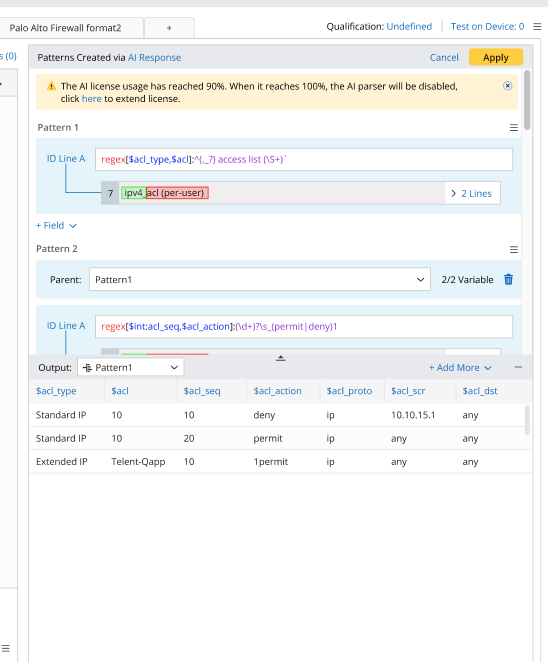
When AI license usage exceeds 90% but remains below 100%, a notification is displayed at the top of the right pane after a prompt is sent. The notification reads: “AI license usage has reached 90%. When it reaches 100%, the AI parser will be disabled. Click here to extend the license.”. The notification can be dismissed and includes a hyperlink to the online help page. User operations are not affected.
AI License Usage Has Reached 100%
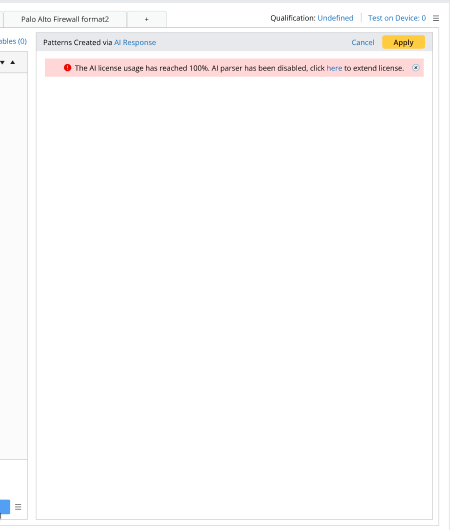
When AI license usage has reached 100%, a notification is displayed at the top of the right pane after a prompt is sent. The notification reads: “The AI license usage has reached 100%. AI parser has been disabled, click here to extend license.”. The notification can be dismissed and includes a hyperlink to the online help page. User operations are not affected. User can still apply existing pattern or edit the pattern.
Prompt Input Pane is Invisible in Certain Circumstances
The Prompt Input Pane is not shown in parser editor in the following scenarios:
- API keys are not configured in AI System Settings.
- AI Function is disabled for the current domain in AI System Settings.
- LLM Model Settings are not property configured in AI System Settings.