R12.3-2026Apr21
Run CX Cloud Data Retrieval Plugin
Follw the steps below to run CX Cloud Data Retrieval Plugin.
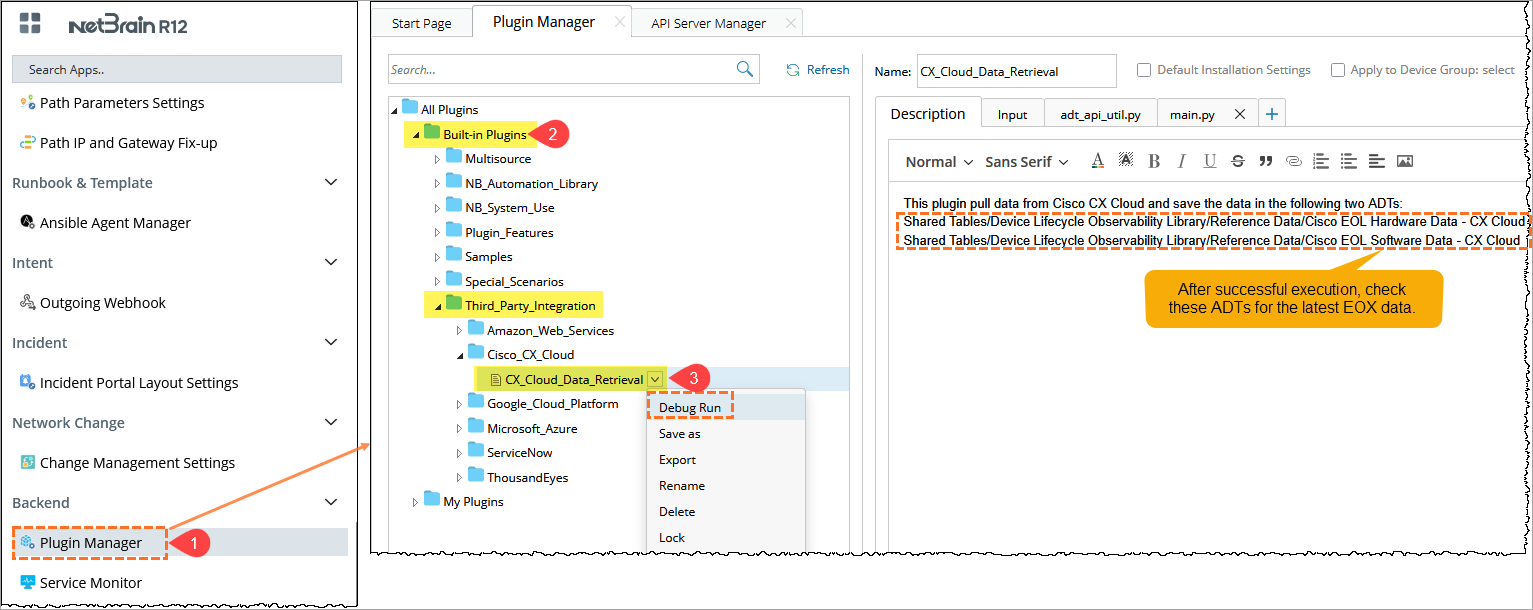
- In the Domain Management page, click the main menu
 and select Plugin Manager.
 - Go to Built-in Plugins > Third_Party_Integration, and locate the CX Cloud Data Retrieval plug-in.
- From the CX Cloud Data Retrieval drop-down, click the Debug Run option.
Allow the plugin to finish retrieving data. Data retrieval may take a few minutes depending on the data size and API response time.

|
Note: Ensure the Cisco CX API Server configured in Step 1 is successfully connecte. If the API connection is not valid, the plugin will not fetch any data. |