R12.3-2026Apr21
Save Input as Goal
- Hover on a specific prompt and click Set as Goal to pin it to the top for quick location or reuse.
- The prompt is pinned as Goal 1, and the current prompt is also labeled in the chat.

When multiple goals are set, you can view them in the drop-down list. The Analysis field displays the top 2-3 sentences in the AI’s final response for the goal. In this case, the root cause was successfully identified after the AI re-analyzed the newly executed results from the recommended automation.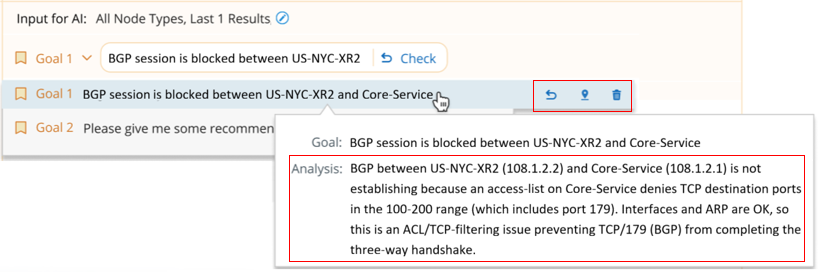
- Resend (
 ): Resend the prompt automatically.
 - Locate (
 ): Locate to the corresponding chat.
 - Delete (
 ): Directly delete the goal. If you delete a goal, the others will be automatically renumbered.