R12.3-2026Apr21
Set up Meraki API Server in NetBrain
Follow the steps below to Set up an API Server for Meraki.
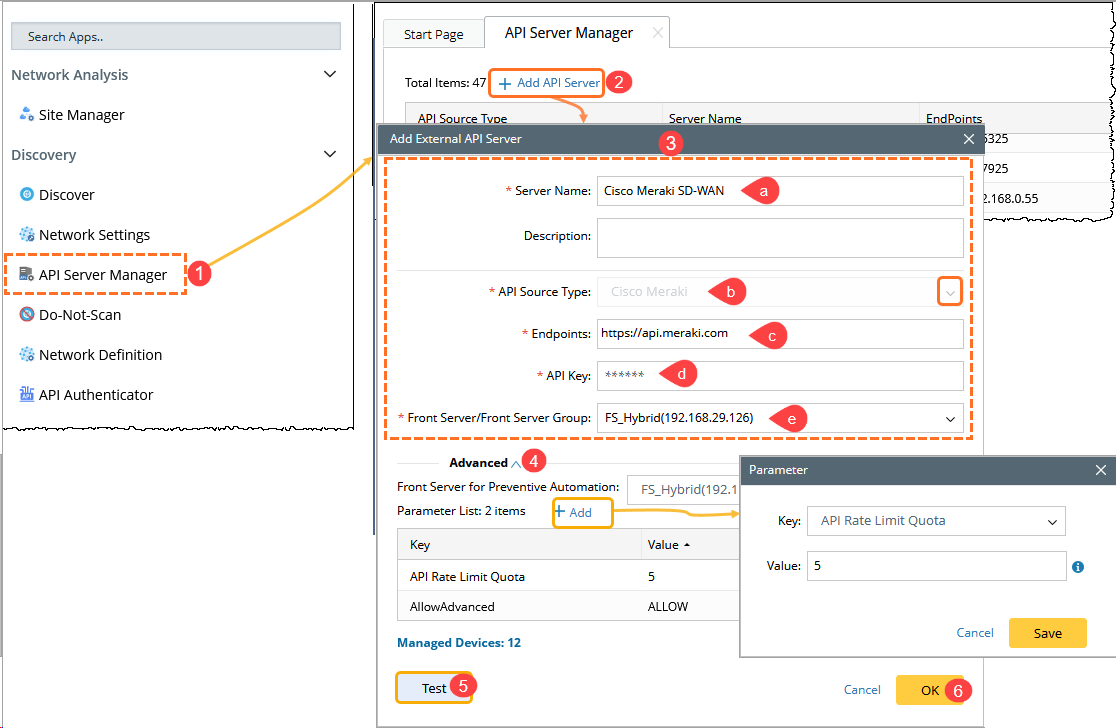
- On the Domain Management page, navigate to Discovery > API Server Manager.
- In the API Server Manager window, click + Add API Server.
- In the Add External API Server window, configure the following:
a. Enter a unique Server Name and an optional Description.
b. From the API Source Type drop-down list, select Cisco Meraki.
c. In the Endpoints field, enter the URL of the Meraki controller (for example, https://api.meraki.com).
d. In the API Key field, enter the Cisco Meraki Dashboard API key.
e. From the Front Server/Front Server Group drop-down list, select a Front Server that can access the Meraki controller.
- Expand the Advanced section, then click Add to configure parameters as needed (for example, API rate limit settings).
- Click Test to verify connectivity between the Front Server and the Meraki controller.
- Click OK to save the API server configuration.
After adding the API server, proceed to Discover Meraki Devices.