R12.3-2026Apr21
Set Up Combined Access
This section uses the following terms:
- Gateway Account: The AWS account where user account created with required permission. This account can also be discovered using secret keys by NetBrain.
- Monitor Account: Any other AWS account whose resources you want NetBrain to discover. NetBrain accesses this account by using the user account in the Gateway Account to assume an IAM role created in the Monitor Account.
As shown in the diagram below, monitored accounts on the right-hand side are the accounts you will add to NetBrain for management purposes. You will need to configure the proper roles for these accounts to be accessed by the gateway account.
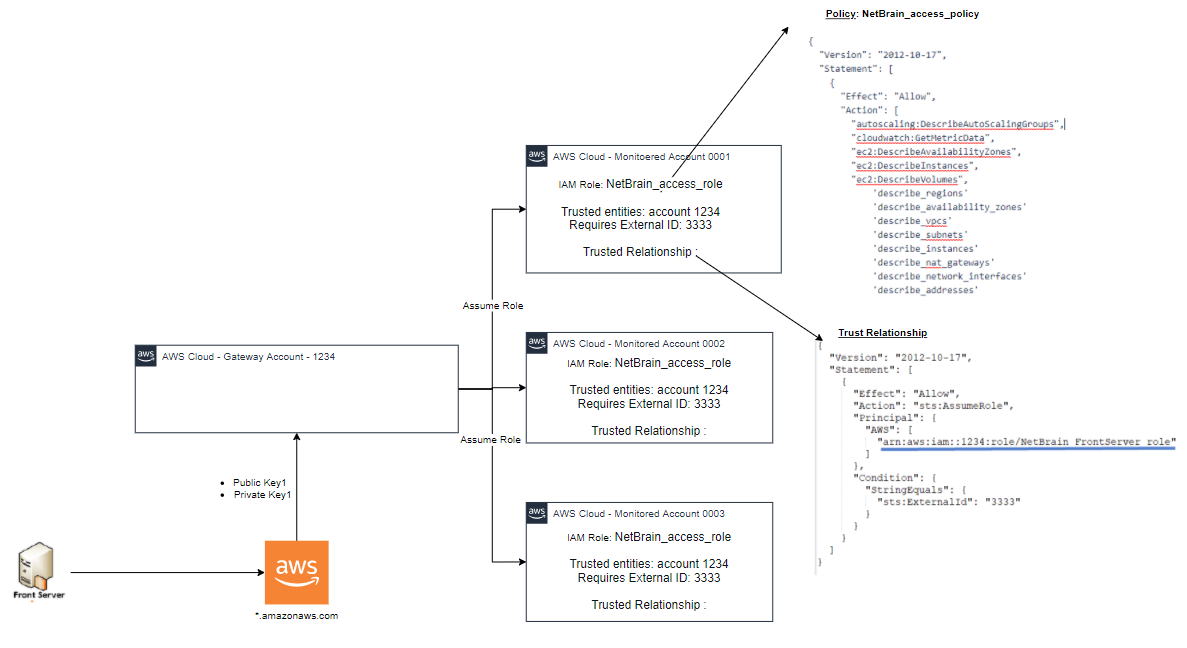
Compared to pure role-based access, combined access uses key-based access to gain entry to the gateway account, providing the flexibility to deploy Front Servers in any desired location.
Follow the topics below to set up the combined access: