Configure NetBrain System
Follow the steps below to add the accounts to monitor:
- On the Domain Management page, click the start menu, navigate to Discovery > API Server Manager.
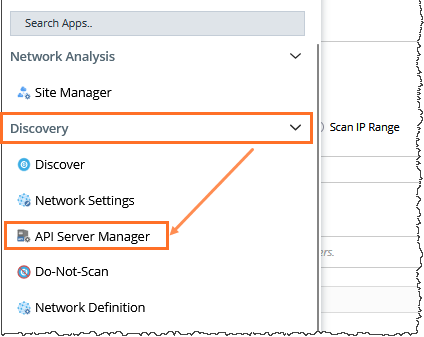
- In the API Server Manager configuration page, click Add API Server to add an API Server entry into the table for each account to be monitored.
- Configure the parameters in the Edit External API Server window as follows:
- API Source Type: Select Amazon AWS.
- Access Method: Select Role-based Access.
- Endpoints (Account ID): Enter the AWS Monitor account ID
- External Id: Enter the External ID previously selected for the trust relationship in the AWS Monitor account.
- Role Name: Enter the role name previously selected in the AWS Monitor account.

More information about the configuration parameters is as follows:
Tip: Alternatively, you can call NetBrain northbound APIs to add/update/delete AWS accounts if you have integrated them with your NetOps automation flow. For more information about the APIs, refer to Using REST API to Manage AWS Data. Display Name
Mandatory
Notes
Combined
Authentication Method
Yes
Authentication method to access account resources.
Use the drop-down menu to select from KeyBase or RoleBase.
Endpoint (Account ID)
Yes
The AWS account to be monitored.
Region Names
No
Comma-separated official AWS region names.
Explicitly specify and limit the regions to monitor. Default to all publicly accessible regions if not specified.
Key-Based
Access Key Id
Yes
Program access key associated with an IAM user, which can be used for programmatic access to AWS account resources.
Secret Access Key
Yes
The secret key associated with the access key for authentication purposes.
Role-Based
Role Name
Yes
Role configured in AWS account for role-based access.
External ID
Yes
external ID configured for the role in the monitored account. As recommended by AWS, this is a mandatory field for security purposes.
Session Name
No
The Session Name will show in the CloudTrail log of the monitored account. It can be used for auditing purposes. Default to "netbrain_monitor" if not configured.
- Click Test to verify that NetBrain system has access to the AWS account resources. If it fails, check if the roles and policies are configured properly.
