Agentic NetOps: The Right Direction, and the Real Work Ahead
NetBrain’s big announcement was so big, it took over the Sphere. But this was Cisco Live, so let’s talk about what Cisco had to say too. In his keynote, Jeetu...

API integration is key to any IT support solution. When you encounter a network issue that points to a bug and don’t have the capacity to resolve it, the traditional next step is often a web ticket or contacting Cisco’s Technical Assistance Center (TAC), which can kick off a time-consuming information exchange.
NetBrain changes this experience by integrating your troubleshooting data directly with Cisco TAC’s automation tools. This partnership brings NetBrain’s automation and Cisco’s decades of expertise — now digitized as scripts and runbooks — into your workflow, acting as a virtual extension of your team without the added overhead.
Cisco transformed decades of hands-on experience into automated scripts that capture proven troubleshooting practices. The company digitized its expertise into a script library that lets it detect device issues early based on previous ones. The integration leverages Cisco TAC diagnostic intelligence with NetBrain’s automation and dynamic mapping interface to deliver automated, proactive issue identification and resolution. Ultimately, this integrated approach supports business continuity and reduces operational risk — here’s how:
When networks fail, speed and accuracy matter. NetBrain’s integration with Cisco TAC puts essential tools at your fingertips, including automated diagnostics, live network data, and tried-and-true runbooks. Engineers can track down problems faster, confirm what’s causing them, and take corrective action with confidence.
Here are real-world scenarios that show how this approach applies in practice.
What do you do if you’re having trouble isolating a spanning-tree issue on a campus network because it keeps moving as you’re researching? Or, what if you’re battling to correlate your notepad of ports to find the source?
Although this sounds like a circa 2005 issue, it still occurs today. Daily, new engineers and networks are affected by the same “do more with less attitude” as everything else.
You have two options:
Another common example in today’s networks is when you have a user connected via wireless. Their mobile device doesn’t seem to have an issue, but the company-issued laptop keeps going in and out of wireless coverage throughout your building. How do you troubleshoot?
Hopefully, you’re running a controller-based wireless network, or this could be very problematic. NetBrain through its Cisco TAC API integration helps you identify if there are issues with a configuration that might point to root causes, such as:
Applications dominate how we live, but it’s people who use those applications, and every day, they grow less tolerant of delays. Customers care more about mean time to resolution (MTTR) than the root cause analysis. You need a way to impact them in everything you do, and the best way to do that is by fixing issues promptly, efficiently, and before they get that first complaint ticket sent.
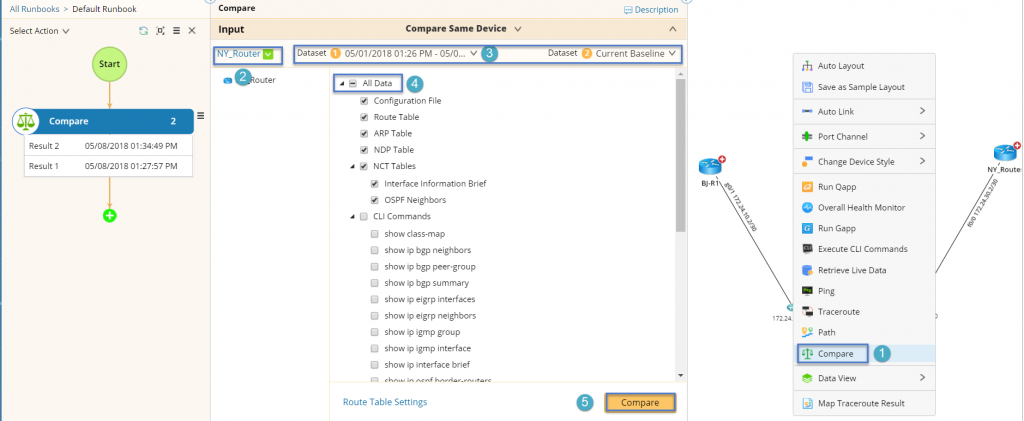
Here’s a final example. Say you’ve got a data center migration occurring and your NetBrain documentation is up to date with automatically triggered benchmarks. During the migration, you notice a loss of access to a particular segment of your data center. You look into the issues, but the routes and configurations seem OK. You’re lost, confused, and anxious as every minute counts.
With the historical map data, you can see that access to the segment changed after a particular configuration about 30 minutes ago. The differential within the map shows you the exact issue and cause — the reason is not important. What matters is that your NMS, documentation, support teams, and overlays make it easier, more sustainable, and quicker to implement any solution.
This NetBrain integration closes the gap between detection and resolution by merging automated, map-driven insights with Cisco’s case-proven diagnostics. Move from reactive resolutions to controlled, data-driven troubleshooting that protects performance and stability. Put this integration to work in your environment — book a demonstration to see how you can elevate your results today.