AI Diagnosis & Investigation
Most of the time spent on a network incident is spent on investigation: reading device output, chasing correlations, ruling out false positives. NetBrain hands that pre-work to AI in the form of historical tickets. Engineers arrive at a diagnosis rather than beginning one, with every finding transparently explained and every step traceable.AI Ticket Analysis
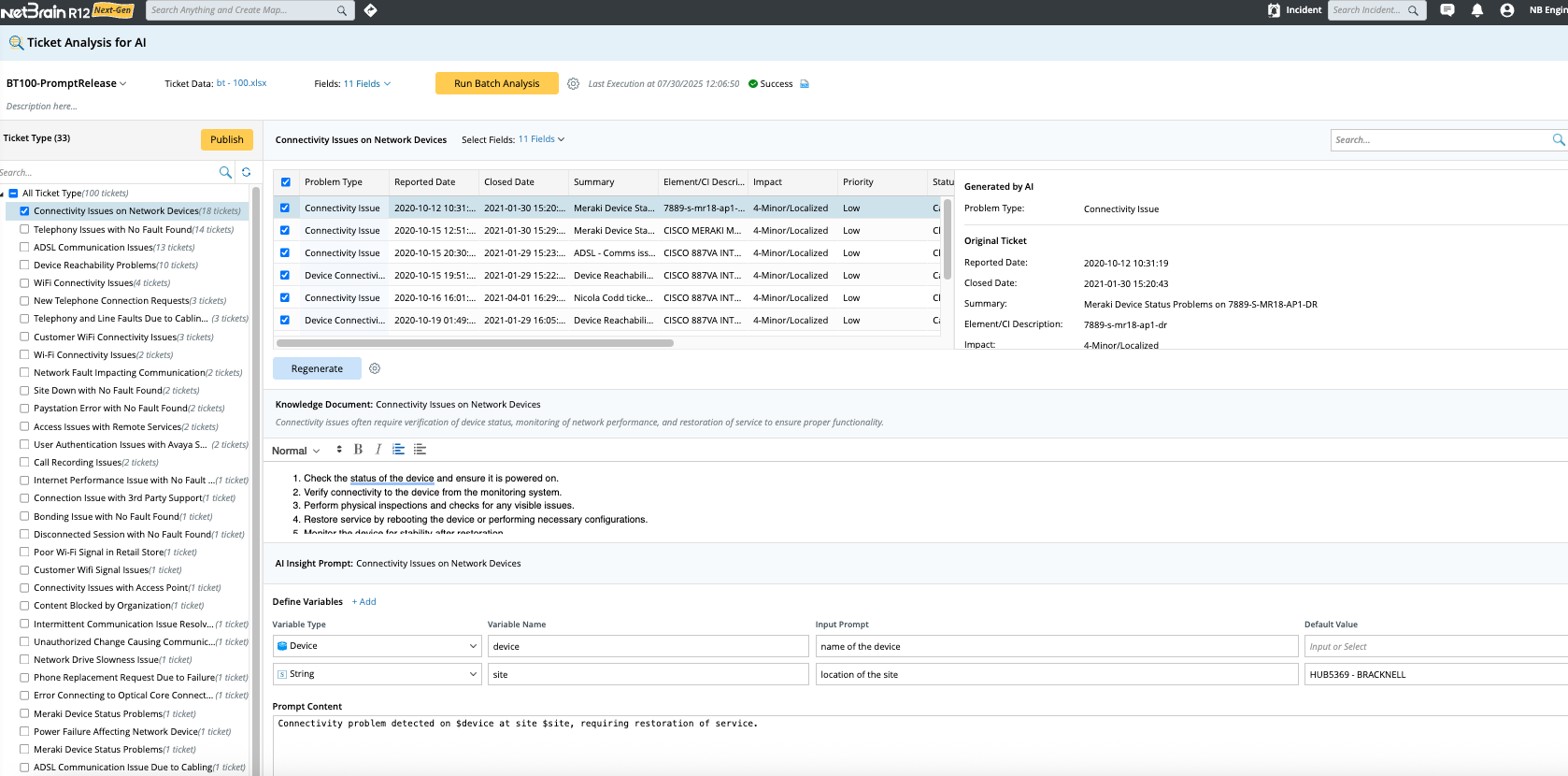
You can’t improve what you haven’t measured. Your resolved ITSM tickets contain years of proven troubleshooting logic — every closed incident is a record of how your team diagnosed a real problem and fixed it. AI Ticket Analysis turns that institutional knowledge into something the agent can use over and over.
Import and classify raw ticket data, turning it into agent-ready knowledge
Import a CSV export from your ITSM system, and the LLM analyzes the ticket fields, classifies incidents by type, and generates two outputs per category: summarizing the troubleshooting procedures your team used to resolve that class of issue and an AI prompt the agent can invoke automatically when it encounters the same pattern.
Review, refine, publish
Before anything goes live, you verify it. Ticket types are viewable alongside their source tickets, so classifications can be confirmed. Regenerate prompts if the first pass needs refinement. When ready, publish prompts.
Diagnosis grounded in your history
From that point forward, when AI Insight encounters a known incident type, it reasons from your team’s validated resolution history, not generalized training data. The more ticket history you feed in, the more specifically the agent understands the problems your network actually has and the fixes that have already worked in your environment.
Triggered Automation Framework (TAF)
Your best engineers shouldn’t spend their morning triaging tickets that a machine can already solve. TAF is the event-driven layer of your troubleshooting workflow that fires a diagnosis without a human kickoff, populating tickets with relevant analysis before anyone takes them.
TAF accepts incidents from two directions: automated signals from external systems, and self-service requests from engineers who never need to open NetBrain.
Automated triggers
ServiceNow, Splunk, BMC Remedy, or any IT system that can make an API call. A ticket opens or an alert fires, TAF receives the payload, matches it to the right diagnosis configuration, and executes. No human dispatches it.
Self-service triggers
Microsoft Teams Bot, email, ServiceNow App, or the Incident Portal. An engineer describes the problem in the channel they’re already in. TAF picks it up and runs a diagnosis. The answer is returned without ever having to leave their workflow to get it.
For both paths, TAF matches the incoming incident to pre-defined criteria, selects the appropriate Network Intent or ADT, and runs the diagnosis. Results surface in the Incident Pane, the originating app (ServiceNow, Teams, email), and the dashboard.
Engineers see the result, not the dispatch.

AI Path
AI Path
Validate paths on demand and explain hop-by-hop behavior in plain language. Two complementary capabilities — one that catches what the path engine missed, one that explains what it found.
AI Path Doctor
Path accuracy has always been the silent liability in network operations. When a path changes from its history — a hop, a non-standard design, a routing table — every diagnosis and automation built on it inherits that error. AI Path Doctor improves the foundation.
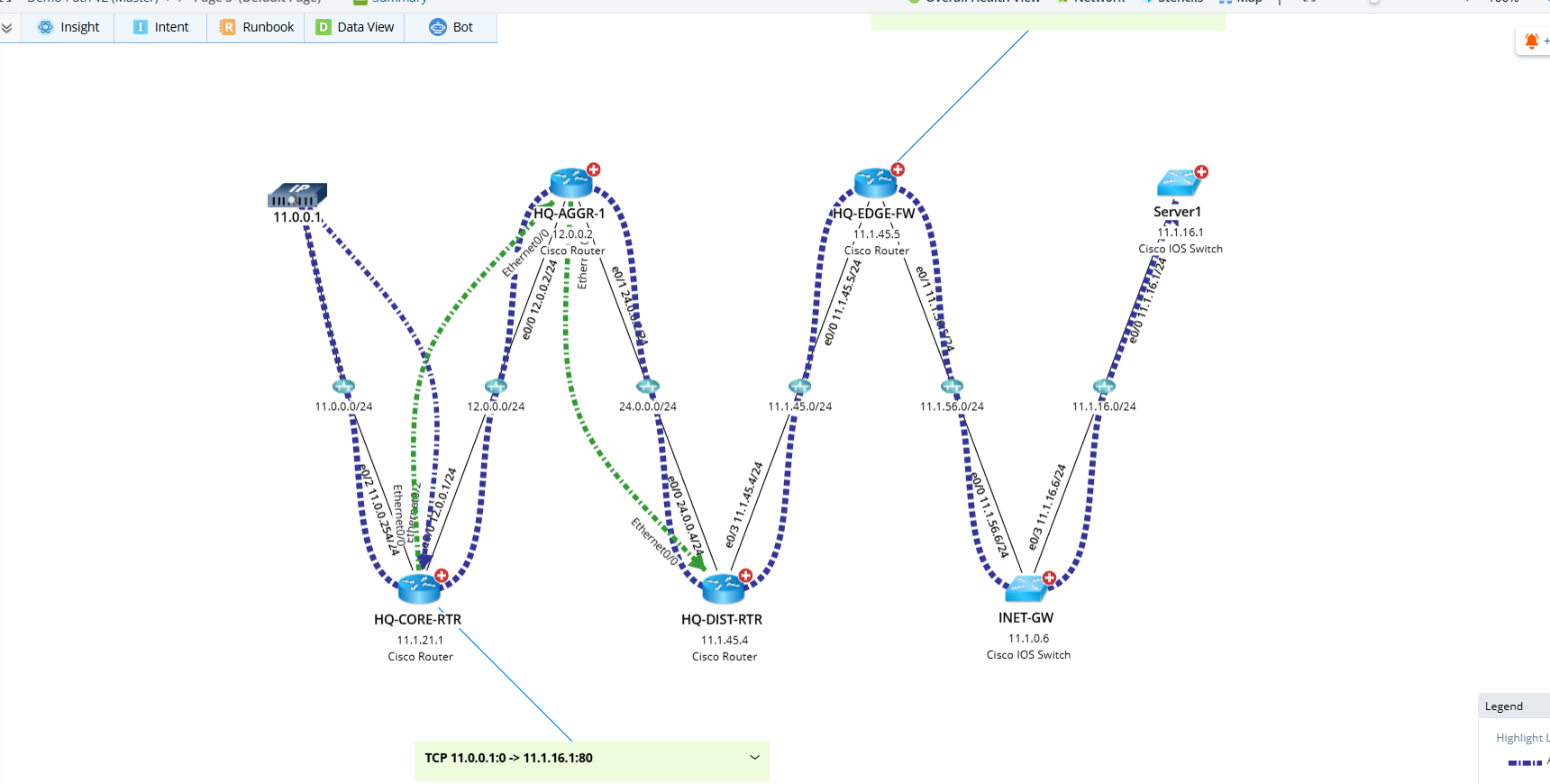
It computes a full end-to-end path independently using live network data, then lays it alongside the NB-Path on the map so you can validate missing devices, incorrect hops, forwarding logic gaps as they surface on the map, not during a post-incident review.
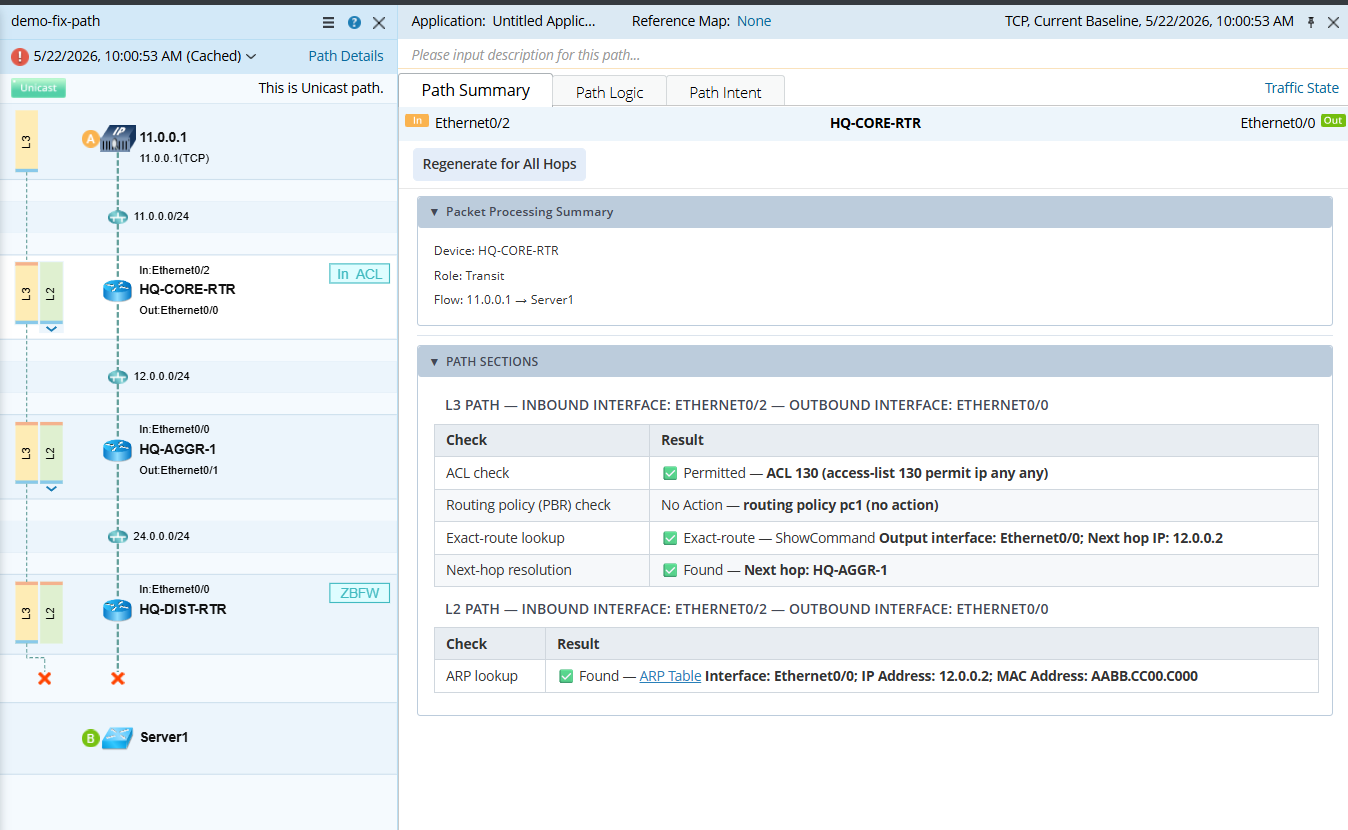
The calculation is transparent by design. The AI Path Details panel shows you the full reasoning chain: the prompt submitted to the AI engine, the logic it followed hop by hop, and a structured summary — source gateway used, next-hop selection policy, whether L2 segment resolution was applied, and why. For every hop: ingress interface, egress interface, active next-hop IP, L2 adjacency MAC, routing table lookup, CEF decision, and policy checks. Not a black box. An audit trail.
When something’s wrong, and you need NetBrain engineering involved, Contact NetBrain collects everything in a single step: NB-Path data, AI-Path data, map topology, CLI command outputs used during calculation, and the full AI reasoning log. No manual assembly. One click, complete package.
The use case for Deep Diagnosis is the same reason this matters: the agents rely on paths. Inaccurate paths produce inaccurate diagnoses. AI Path Doctor validates the ground truth before automation runs on it.
AI Path Summarization
Experienced engineers read a path result and know immediately what it means — which routing decision mattered, where policy got applied, and what the CEF entry is telling them. Everyone else reads the same output and spends 20 minutes figuring out what happened.
AI Path Summarization closes that gap. It reads the full path calculation result and generates a structured, plain-language explanation organized hop-by-hop. A new Path Summary tab in the Path Details pane is where this lives. Select any device along the path to view the AI-generated summary for that hop.
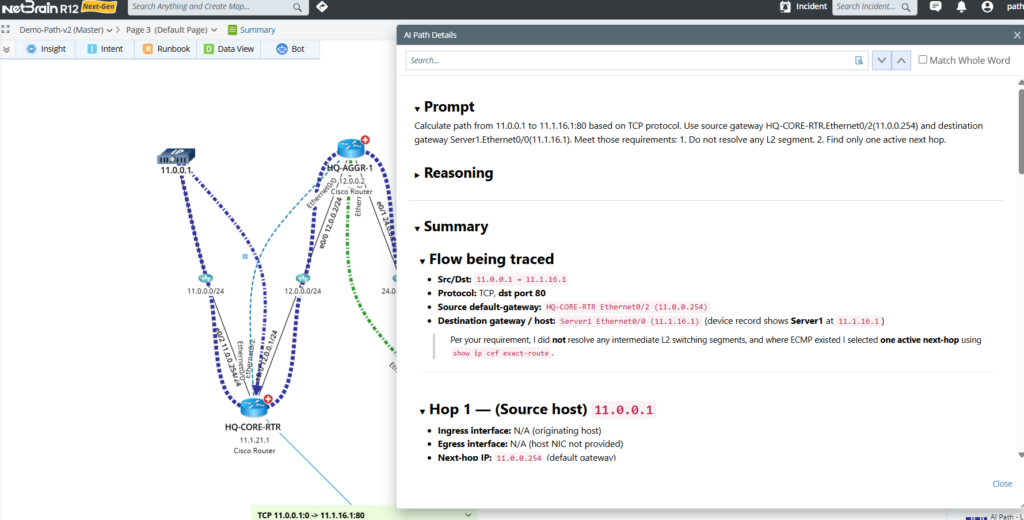
Each summary section breaks down the same way: the reasoning logic the path engine used, the data sources it pulled from, what it observed at that step, and the conclusion it reached. Errors caught during path calculation appear here, too. Nothing is abstracted away — the summary includes direct links to the underlying data: configuration details, NCT tables, CLI outputs — so engineers can verify in one click rather than hunting through raw logs.
Summarization runs progressively. Results appear as they’re computed, device by device, so you’re reading while the rest is still generating. Summaries are automatically saved with the path instance — reopen the path later and it’s already there, no re-run required. If a new path calculation starts mid-summarization, it stops cleanly and saves it.
For complex environments with multiple path types (L2, L3) and cross-device dependencies, the summary handles each type as a collapsible section, readable at whatever depth the engineer needs.
The result: every path query returns a senior engineer’s read of the data, regardless of who ran it.